
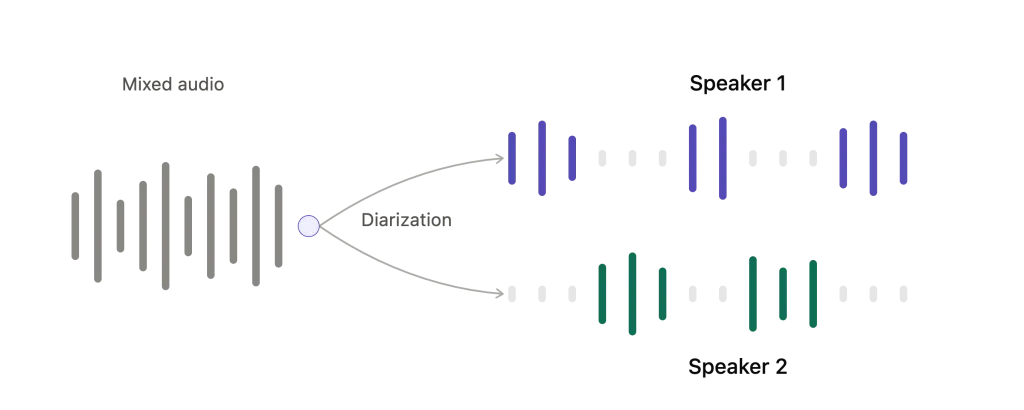
Speaker diarization is the process of dividing an audio recording into “who spoke when” segments. In a finished transcript, that usually appears as labels such as Speaker 1 and Speaker 2 beside the right parts of the conversation. It makes a multi-person recording easier to read, search, and review—but it does not automatically prove someone’s real identity.
For interviews, meetings, podcasts, and research conversations, that turns a long transcript into something much easier to review. The labels can then be confirmed or renamed where needed.
What Is Speaker Diarization?
In speech technology, speaker diarization answers two questions: when does each speaker talk, and which spoken segments belong together? The output is commonly called diarized audio or a diarized transcript.
It is different from speaker identification. Diarization can label two distinct voices as Speaker 1 and Speaker 2 without knowing their names. Identification tries to match a voice to a known person. The two may be used together in some products, but they are not the same feature.
How AI Separates Speakers
A diarization system analyzes changes in voice characteristics across the recording. A simplified workflow looks like this:
- Speech activity detection: finding where someone is speaking.
- Voice grouping: clustering similar voice segments together.
- Segment timing: placing each label beside the correct portion of the transcript.
- Review and correction: checking labels and correcting errors before important use.
This is why a clean recording helps. Overlapping speech, room echo, background noise, similar-sounding voices, and a distant microphone can all make speaker diarization less reliable.
From Raw Transcript to Reviewable Conversation
| 1. Raw transcript One long block of text | 2. Speaker separation Segments grouped by voice | 3. Rename labels Confirm Speaker 1 → interviewee | 4. Review Check key attribution against audio |
The chart shows the right expectation: AI can organize the first pass, while the person using the transcript confirms names and checks important claims.
Why Speaker Diarization Is Useful
The value is not simply knowing that more than one person spoke. It is making the transcript usable afterwards. You can scan questions and answers, find a particular participant’s contribution, or quickly see where the discussion changed hands.
- Journalists reviewing interviews and correcting names before publication.
- Researchers organizing qualitative interviews.
- Teams reading meeting transcripts with several contributors.
- Podcasters preparing edits from a conversation with guests.
Speaker Diarization vs. Speaker Identification
| Speaker diarization | Speaker identification | |
| Goal | Separate “who spoke when” | Match a voice to a known person |
| Typical label | Speaker 1, Speaker 2 | Alex, Maya |
| Needs prior voice profile? | No | Usually yes |
| Review needed? | Yes, especially for important work | Yes |
How Geode Calls This Feature: Speaker Separation
Geode calls this capability speaker separation. On Mac and Windows, it groups different speakers within a local transcript and shows labels such as Speaker 1. You can then confirm a label and apply a name to all matching segments, as shown in the interface.
This is speaker separation, not a claim that Geode knows a person’s real identity. Review the transcript and labels before relying on them for reporting, research, or any decision where attribution matters.
On supported Mac and Windows desktops, speaker separation is part of Geode’s local transcription workflow, so a recording does not need to be uploaded to a cloud service just to separate speakers. Feature availability varies by platform.
A Simple Speaker Separation Workflow
Use this four-step process for an interview, meeting, or podcast recording:
1. Transcribe the recording
Create a transcript from a clear audio file, then open the transcript view.
2. Check the speaker labels
Scan the separated segments. Treat Speaker 1 and Speaker 2 as working labels, not confirmed identities.
3. Rename the confirmed speakers
When you know who a label represents, rename it and apply the name to matching segments. In Geode, this is the confirmation step shown in the interface.
4. Verify important passages
For quotes, decisions, findings, or publishable material, replay the relevant audio and correct the transcript or label if needed.
Tips for Better Speaker Separation
- Record close to each speaker when possible.
- Avoid people talking over one another.
- Use a quiet room and reduce echo.
- Rename labels early, then review key passages against the recording.
- Treat diarization as an editing aid—not a final verification step.
Conclusion
Speaker diarization makes multi-person transcripts much easier to work with. Let AI separate the voices, rename the labels when you know who they belong to, and check important attribution against the original audio.



