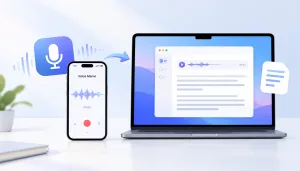
AI transcription has moved well beyond turning speech into text. The better tools in 2026 can record conversations, separate speakers, generate summaries, create AI notes, and help you find important moments without replaying an entire recording.
But the tools are no longer all solving the same problem.
Some are built around meetings and team collaboration. Others focus on interviews, lectures, podcasts, or existing audio files. Some run primarily in the cloud, while local-first tools can handle transcription—and in some cases summarization—directly on your device.
Here are six AI transcription and summarization tools worth considering in 2026, and the workflows they fit best.
Quick Comparison
| Tool | Best for | Transcription | Summarization | Main approach |
| Geode | Interviews, research, lectures, long recordings, local-first workflows | Yes | Yes | Local-first, cloud optional |
| Otter.ai | Online meetings and collaborative notes | Yes | Yes | Cloud meeting assistant |
| Fireflies.ai | Teams, sales calls, CRM workflows | Yes | Yes | Cloud meeting intelligence |
| Notta | Multilingual transcription and meeting notes | Yes | Yes | Cloud transcription workspace |
| Descript | Podcasts, video, and content creation | Yes | Yes | Transcription + media editing |
| MacWhisper | Mac power users who want local transcription and configuration | Yes | Yes | Local transcription + configurable AI workflows |
1. Geode — Best for a Local-First Recording-to-Review Workflow
Geode takes a different approach from most AI meeting notes products. Instead of starting with a meeting bot or a cloud workspace, it starts with the recording itself.
You can record or import interviews, lectures, research conversations, podcasts, meetings, and other audio, then turn them into searchable transcripts. AI transcription runs on-device by default on supported iPhone, iPad, Mac, Android, and Windows devices, so a recording does not need to be uploaded to a cloud service just to become text.
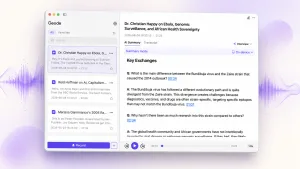
On desktop, Geode adds speaker separation on Mac and Windows, deeper transcript review, search, editing, and timestamp-based replay. On supported Macs, it also includes built-in local Smart Summaries with templates. Optional cloud transcription and cloud summaries remain available when you choose them.
The workflow can continue across devices: capture on mobile, transfer recordings over local Wi-Fi, then continue on Mac or Windows for deeper review. That makes Geode useful for work that begins away from a desk and does not fit neatly inside a scheduled meeting.
Best for: Journalists, researchers, students, podcasters, consultants, and professionals who work with interviews, long recordings, or sensitive audio.
Why choose it: Local-first AI transcription, offline workflows, speaker separation, searchable transcripts, built-in local summaries on Mac, and a recording-to-review workflow across mobile and desktop.
2. Otter.ai — Best for Cloud-Based Meeting Notes and Collaboration
Otter.ai is built around online meetings and shared notes. Its AI Meeting Agent can join Zoom, Microsoft Teams, and Google Meet calls, create transcripts, and generate automatic meeting notes and summaries in the cloud.
After a conversation, users can review the transcript, work with AI notes, identify action items, and share meeting output with other participants. Otter also supports imported audio and video, but its center of gravity remains the meeting workflow.
That makes Otter a stronger fit when the transcript is meant to become shared team content. Geode and Otter therefore solve overlapping but different problems: Otter emphasizes cloud meeting collaboration, while Geode emphasizes local-first processing, long-form recordings, and individual control over when cloud AI is used.
Best for: Teams and professionals whose work happens mainly in online meetings and shared workspaces.
Why choose it: Automatic meeting capture, AI meeting notes, summaries, action items, shared transcripts, and collaboration.
3. Fireflies.ai — Best for Team Meeting Intelligence
Fireflies.ai goes beyond basic automatic meeting notes. It records and transcribes meetings, generates summaries, and provides a workspace for searching, sharing, and analyzing conversations.
Fireflies can capture meetings through its AI notetaker and other recording or import workflows. Its AI summaries can organize key points, decisions, action items, and other information from a conversation.
The bigger difference is what happens afterward. Fireflies is designed to connect meeting information with team workflows, including CRM and productivity systems. That makes it particularly useful for sales, recruiting, customer success, and other teams that want conversation data to move into the rest of their software stack.
Best for: Teams that want transcription, automatic meeting notes, conversation intelligence, and integrations in one system.
Why choose it: Strong meeting automation, AI summaries, team collaboration, search, analytics, and integrations.
4. Notta — Best for Multilingual Transcription
Notta combines AI transcription, AI notes, summaries, translation, and several ways to capture audio.
It can transcribe live conversations, online meetings, uploaded audio and video, and browser-based content. Its multilingual features make it useful when recordings regularly cross languages.
Notta’s AI Notes can turn a transcript into structured summaries, helping users pull out key points, decisions, and action items. That makes it useful when the same tool needs to handle both transcription and summary generation across multiple languages.
Best for: International teams, multilingual meetings, interviews, lectures, and users who need transcription plus translation.
Why choose it: Broad language support, AI transcription and summarization, translation, templates, and flexible import options.
5. Descript — Best for Creators Who Need to Edit What They Record
Descript is different from a typical AI transcription tool because transcription is part of a larger audio and video editing workflow.
Import or record audio or video and Descript creates a transcript. Edit the text, and you can edit the underlying media. It also provides speaker labels, captions, filler-word removal, AI editing tools, and summary features for turning longer content into shorter written output.
That makes Descript particularly useful when the transcript is not the final destination. A podcaster might use it to edit an episode, create show notes, and publish clips. A video creator might use the same transcript to edit dialogue and create captions.
Best for: Podcasters, video creators, YouTubers, and content teams.
Why choose it: AI transcription combined with text-based audio and video editing, captions, summaries, and publishing tools.
6. MacWhisper — Best for Mac Power Users Who Want More Configuration
MacWhisper is a strong local transcription option for people whose workflow is centered on the Mac. Like Geode, it can perform AI transcription locally, so local transcription alone is not the most useful way to distinguish the two.
MacWhisper is particularly strong for technically comfortable users who want model choices, advanced settings, batch transcription, watch folders, dictation, webhooks, automation, and configurable AI providers. Its summary workflow can use supported Assistant, provider, or local-LLM configurations depending on how the user sets it up.
Geode takes a more integrated approach. On Mac, recording or import, local transcription, speaker separation, transcript search and editing, timestamp replay, and built-in local Smart Summaries are part of the product workflow without requiring the user to choose an AI provider or supply an API key for the built-in local summary path. Geode also extends the same recording-to-review workflow across iPhone, iPad, Mac, Android, and Windows.
The choice is therefore less about whether either product can transcribe locally and more about how much configuration you want. MacWhisper gives Mac power users more control over the components; Geode is designed to reduce setup between recording and usable output.
Best for: Mac users who value model choice, batch processing, automation, APIs, providers, and advanced configuration.
Why choose it: Local AI transcription with a highly configurable Mac-focused workflow.
What Should You Look for in an AI Transcription Tool?
Accuracy matters, but it should not be the only thing you compare. The best AI transcription tool is the one that fits what you actually do with the recording afterward.
Transcription and Summary
A transcript and a summary serve different purposes.
The transcript is the detailed record of what was said. A summary helps you understand the conversation quickly. For interviews, research, meetings, and other important work, keep access to the transcript and original audio rather than treating an AI summary as a replacement for them.
Speaker Separation
If more than one person is talking, speaker labels make a transcript much easier to review. This matters especially for interviews, focus groups, podcasts, and meetings with several participants.
AI speaker labels should still be reviewed when attribution matters.
Meetings vs. Recorded Audio
If almost everything you transcribe happens in Zoom, Teams, or Google Meet, a meeting-first tool such as Otter or Fireflies may fit naturally.
If you also work with interviews, lectures, field recordings, podcasts, or audio files you already have, look closely at how an AI transcription tool handles recordings outside the meeting workflow.
Local vs. Cloud Processing
Most AI transcription services process recordings in the cloud. That can be convenient, particularly for collaboration, automatic meeting notes, and shared team access.
Local processing offers another option. Audio can be transcribed on the device itself, which is useful when you need offline access or do not want a particular recording uploaded just to create a transcript.
Neither approach is right for every recording. Geode combines local processing by default with optional cloud AI, while tools such as Otter are designed around cloud meeting workflows. The practical question is which tasks you want to keep local and which benefit from the cloud.
Built-In vs. Configurable AI Workflows
Local AI tools also differ in how much setup they expect from the user. A configurable tool may let you choose models, providers, API keys, automations, and local LLMs. An integrated tool can put transcription and summary generation into one ready-to-use workflow.
MacWhisper is a good example of the configurable approach. Geode is closer to the integrated approach, including built-in local summaries on supported Macs. Neither model is universally better; it depends on whether you value configuration or a shorter path from recording to usable output.
Search and Review
An audio summarizer is useful when you want the main points quickly. Searchable transcripts solve a different problem: finding exactly where something was said.
For long recordings, the ability to search, replay, edit, and return to the original context can matter as much as the summary itself.
Which AI Transcription and Summarization Tool Is Best?
There is no single answer.
Choose Otter.ai if most of your work happens in online meetings and you want automatic meeting notes and shared cloud collaboration.
Choose Fireflies.ai if meeting transcripts need to flow into team, sales, or CRM workflows.
Choose Notta if multilingual transcription and translation are priorities.
Choose Descript if transcription is the starting point for editing and publishing audio or video.
Choose MacWhisper if your work is centered on the Mac and you value model selection, batch processing, automation, APIs, providers, and advanced configuration.
Choose Geode if you want a more integrated recording-to-review workflow with local AI transcription by default, built-in local summaries on Mac, and the ability to continue across mobile and desktop.
The important question in 2026 is no longer simply, “Which tool can transcribe audio?”
Most good tools can.
The better question is: What do you want to do with the recording after it becomes text?
That answer usually tells you which tool fits your workflow.
What is AI transcription?
AI transcription uses speech recognition models to convert spoken audio into text automatically. Modern tools may also add speaker labels, timestamps, search, editing, translation, and AI-generated summaries.
Can AI transcription tools summarize recordings?
Yes. Many current tools combine transcription and summary generation. The transcript provides the detailed record, while the summary highlights key points, topics, decisions, or action items.
What are AI meeting notes?
AI meeting notes are automatically generated notes based on a meeting transcript. Depending on the tool, they may include a summary, action items, decisions, topics, or follow-up tasks.
Can AI automatically create meeting notes?
Yes. Tools such as Otter, Fireflies, and Notta can generate automatic meeting notes from recorded conversations. The exact workflow varies: some can join scheduled meetings automatically, while others record through desktop, mobile, browser, or import workflows.
Can AI transcribe and summarize audio offline?
Some tools support local AI transcription, but fully offline summarization is less common. Geode supports local transcription on supported devices and built-in local Smart Summaries on supported Macs. MacWhisper also supports local transcription, while its summary workflow depends on the Assistant, provider, or local-LLM configuration selected by the user.
Is an AI summary a replacement for the transcript?
No. A summary is useful for quickly understanding a recording, but it can omit details or wording that matters. For interviews, research, reporting, or important decisions, review the transcript and check critical passages against the original audio.