Getting transcripts for audio playing inside apps on iPhone can make language learning much easier because it turns listening practice into something you can read, translate, replay, and review. Many learners use language apps, podcasts, video lessons, and short audio exercises every day, but they often lose the chance to study what they heard because the audio disappears as soon as the lesson moves on.
That is where Geode can help. Geode is designed to turn supported audio into transcripts, translations, and reviewable notes, so you can study the words behind the sound. Instead of guessing what a fast sentence meant, you can capture the audio, generate text, and return to the difficult lines later.
Why App Audio Is Hard to Study
Listening practice is valuable because it trains your ear in real time. The problem is that app audio is often temporary. A sentence plays once, you miss a word, and then the app moves forward. You can replay the line, but you may still not know what you missed.
This is especially common with language-learning apps, podcast episodes, video clips, pronunciation drills, and listening exercises where there is no visible transcript. Even when the app is useful, the learner may be left without the most important review material: the exact words that were spoken.
A transcript solves that problem by making audio visible. Once the spoken words become text, you can search them, translate them, copy useful phrases, and replay the original audio with better understanding.
What Transcripts for Audio Helps You Do
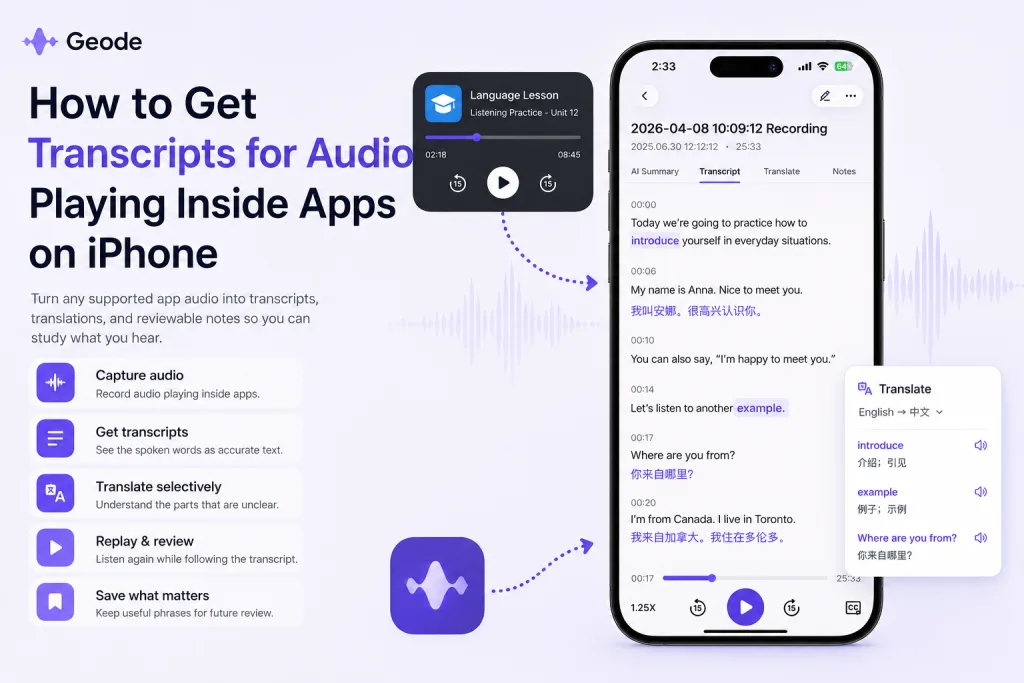
- Confirm what you heard. Instead of guessing, you can check the exact words in the transcript.
- Review difficult lines. Fast sentences, contractions, unfamiliar accents, and new vocabulary become easier to study.
- Translate selectively. You can translate the confusing parts without turning the entire session into a reading exercise.
- Replay with context. Seeing the sentence while hearing the audio helps connect sound, spelling, rhythm, and meaning.
- Save useful phrases. A phrase from an app, podcast, or video can become part of your personal review material.
How to Use Geode to Get Transcripts from Supported App Audio
The basic workflow is simple: capture supported audio, generate a transcript, review the text, translate what is still confusing, and replay the original audio. This keeps listening active while giving you the feedback you need to improve.
- Choose the audio you want to study. This could be a listening exercise, podcast segment, language lesson, video clip, or short audio passage.
- Open Geode and record the supported audio. Use Geode to capture the audio you want to review. Availability may depend on device, app, and supported recording conditions.
- Generate the transcript. After recording, Geode turns the audio into readable text so you can see what was said.
- Translate only the lines that are unclear. This helps you understand meaning without relying on translation for every sentence.
- Replay and review. Listen again while following the transcript. The goal is to need the text less over time.
Best Use Cases for App Audio Transcripts
Language learning apps
Many learners want to review audio from language apps after the exercise is over. A transcript helps turn a short listening activity into material you can study again later.
Podcasts and audio lessons
Podcasts are excellent for immersion, but they can be difficult when speakers talk quickly or use casual phrases. A transcript lets you slow down the review process without losing the original audio.
YouTube and video lessons
Some videos have captions, but not all captions are accurate or review-friendly. With Geode, you can create a transcript from supported audio and use it as a study aid.
Daily conversation practice
Short real-world audio can help you learn how people actually speak. A transcript gives you a way to revisit the words, phrases, and patterns that appeared in the conversation.
Exam listening practice
For learners preparing for listening exams, transcripts can help identify exactly which words or sentence structures caused confusion.
Local or Cloud: Which Processing Mode Should You Use?
Some learners prefer local processing because they want more control over their recordings. Others may choose cloud transcription for non-sensitive audio when they want stronger processing for difficult sound, accents, or longer recordings. A useful rule is: use local when privacy matters, and choose cloud when the audio is not sensitive and accuracy matters more.
For language-learning content, the right choice depends on what you are recording. A short public podcast clip is different from a private conversation. Geode gives you a workflow that can support both kinds of review.
Tips for Better App Audio Transcripts
- Record in a quiet environment when possible.
- Keep the iPhone speaker volume clear but not distorted.
- Use shorter clips when you are studying difficult material.
- Replay the original audio after reading the transcript.
- Save phrases and full sentences instead of isolated words.
- Expect occasional errors when audio is noisy, fast, or heavily accented; always review important lines yourself.
A Simple Review Routine
- Listen first without text.
- Record the supported audio with Geode.
- Read the transcript and mark the confusing parts.
- Translate only the lines that still do not make sense.
- Replay the same section while following the transcript.
- Save two or three useful phrases for later review.
Conclusion
Getting transcripts for audio playing inside apps on iPhone is useful because it gives listening practice a second life. Instead of hearing a sentence once and forgetting it, you can turn that audio into text, translation, replay, and review.
Geode fits naturally into this workflow. It helps language learners turn supported audio into transcripts they can study, translate, and replay, making app audio easier to understand and more valuable as review material.
Last reviewed: August 2026
Can I get transcripts for audio playing inside apps on iPhone?
With Geode, you can record supported audio and generate transcripts for review. Availability may depend on the app, device, and supported recording conditions.
Can Geode translate the transcript?
Yes. Geode can help translate confusing lines so you can connect the audio with meaning. For language learning, it is usually better to translate selectively rather than translate everything.
Does this replace listening practice?
No. The best workflow is to listen first, then read the transcript, translate confusing lines, and replay the audio. The transcript supports listening; it should not replace it.
Is this useful for podcasts?
Yes. Podcast transcripts can help you review fast speech, new vocabulary, and useful phrases from real audio.
Will every transcript be perfect?
No transcript tool is perfect. Accuracy can be affected by background noise, accents, speed, overlapping speech, and audio quality. Always review important lines yourself.