If your goal is to understand what was said rather than analyze the visuals, transcribing the video into text before uploading it is usually the fastest way to reduce AI token costs.
A lot of people search for ways to reduce AI token costs on video uploads after getting a surprisingly large bill from Gemini or another model for something as simple as summarizing a 45-minute meeting recording or podcast episode. Lower token usage doesn’t just reduce cost. It also makes AI responses faster and lets you ask more follow-up questions before hitting context limits.
Tools like Geode handle the transcription step locally, on your own device, so you can hand your AI model a clean, structured transcript instead of the raw video file — and pay a fraction of the tokens for the same result.
What Are AI Tokens, and Why Does Video Cost So Much?
Tokens are the small chunks of data an AI model reads and charges you for, whether that data is text, an image, audio, or video. Text is cheap to tokenize because it’s already compact. Video is expensive because the model has to process a stream of image frames plus an audio track, second by second.
According to Google’s own Gemini API documentation, video is billed at a fixed rate of roughly 263 tokens per second of footage, before you even account for the audio track or any text prompt. That works out to around 15,780 tokens for a single minute of video — before the model has generated a single word of output.
A plain-text transcript of that same minute, by comparison, is typically only 150–200 tokens, since it’s just the words that were spoken, with no frame-by-frame visual data attached.
Why Uploading Raw Video Wastes Tokens
Most of the time, when someone uploads a video to an AI model, they don’t actually need the visual frames at all. If your goal is a summary, meeting notes, or a searchable record of what was said, the model doesn’t need to “see” the video — it just needs the words.
- Visual frames you don’t need: a talking-head interview or a podcast recording rarely has visual information worth 263 tokens per second.
- Repeated processing costs: if you re-upload the same video for a follow-up question, you pay the full video token cost again unless you’ve set up context caching.
- Slower responses: larger inputs take longer to process, which adds latency on top of the extra cost.
This is exactly the gap that local, offline transcription tools are designed to close.
How to Transcribe Video Locally Before Uploading to AI
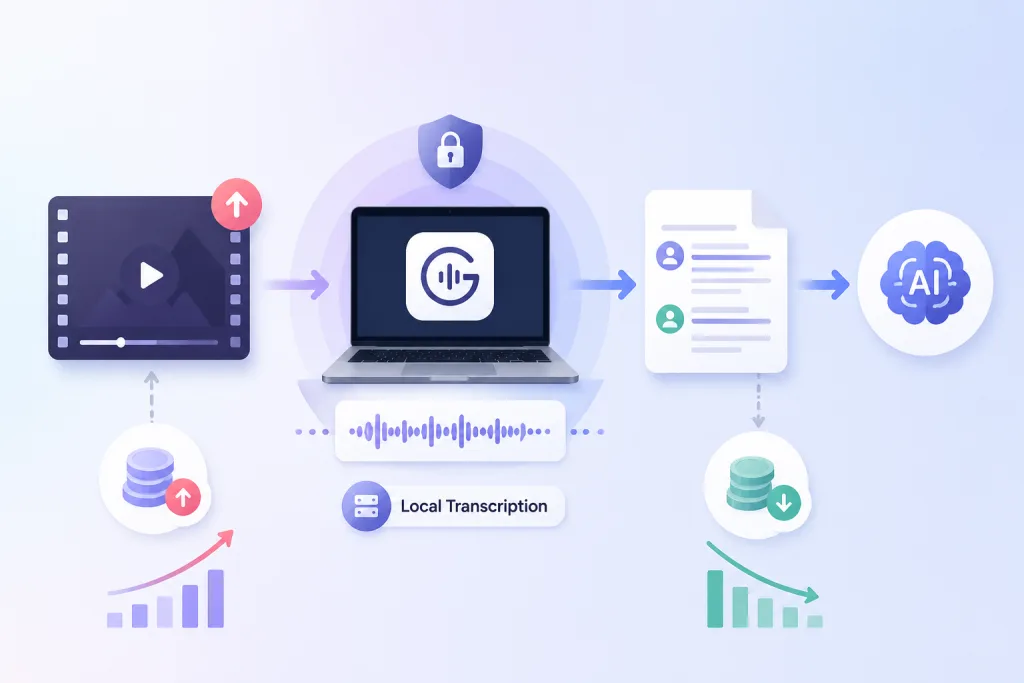
Instead of uploading a full video file to your AI model, you can transcribe the audio locally first and upload only the resulting text. Here’s what that workflow looks like using a local transcription tool such as Geode:
1. Import the recording. Drop in a video or audio file — interviews, meetings, lectures, or podcast episodes all work the same way.
2. Transcribe on-device. Geode runs transcription locally, so the file never has to leave your computer just to become text.
3. Keep speaker labels and timestamps. A structured transcript — speaker names and timestamps intact — gives the AI model more usable context than a flat wall of text, without adding video-level token costs. This also makes follow-up AI prompts much more reliable, because the model can attribute quotes to the correct speaker.
4. Export as text. Export the transcript as Plain Text or a Word document, then paste or upload it into your AI tool of choice.
The result is the same conversation, the same searchable detail, at a fraction of the token cost, because the model is reading words instead of decoding video frames.
Video vs. Text: A Token Cost Comparison
Here’s an illustrative comparison for a 45-minute recording, based on Google’s published video token rate and a typical spoken-word transcript length:
| Input Method | Approx. Tokens (45 min) | Notes |
| Raw video upload | ~710,000 tokens | Based on Google’s documented rate of 263 tokens/second of video |
| Local text transcript | ~8,000–9,000 tokens | Based on typical spoken-word density for a 45-minute conversation |
That’s roughly a 95%-99% reduction in input tokens for the same conversation — actual numbers will vary by model, resolution setting, and how talkative the recording is, but the gap is consistently large.
Case Study: A 3-Hour Trending Podcast, Token by Token
Long, unscripted interview shows are a good stress test for this math, since they push video token costs to an extreme. The Joe Rogan Experience, regularly runs close to three hours per episode.
This isn’t a Geode customer story; it’s simply a real, publicly known episode length used to make the token gap concrete. The numbers below apply to any 3-hour recording — an extended interview, a conference keynote, or a long client call — not to this show specifically.
| Input Method | Tokens (180 min) | Illustrative Cost* |
| Raw video upload | ~2,840,000 tokens | ~$0.85 |
| Audio-only upload | ~346,000 tokens | ~$0.10 |
| Local text transcript | ~32,000 tokens | ~$0.01 |
*Illustrative estimate at roughly $0.30 per million tokens, a typical rate for a lightweight model tier. Actual pricing depends on the specific AI model, its context-length tier, and current rates — the point is the relative gap, not the exact dollar figure.
Even audio-only extraction, which drops the video frames but keeps the sound, is still around 10x more tokens than a plain-text transcript of the same episode. Audio still needs to be processed and tokenized over time, while text is already compressed into words. Stripping all the way down to text is what actually closes the gap.
The pattern holds regardless of scale. Whether it’s a 15-minute standup or a 3-hour interview, transcribing locally first keeps the token bill tied to how much was actually said — not to how long the model has to watch and listen.
Best Practices for a Token-Efficient AI Workflow
- Transcribe first, upload second — treat video-to-text as a standard first step before any AI summary or analysis task.
- Keep speaker labels — they preserve context an AI model would otherwise need extra tokens (or the original video) to reconstruct.
- Use context caching for repeat questions — if you truly need the video itself for a specific task, cache it rather than re-uploading.
- Batch long recordings — for very long interviews or lecture series, transcribe once locally and reuse the same text across multiple AI prompts.
If you regularly work with interviews, meetings, or long-form audio, pairing a local transcription tool with your AI workflow is one of the simplest ways to cut costs without losing any of the detail in the conversation. It also pairs well with speaker separation, which keeps multi-person conversations organized without extra manual cleanup.
For very large files, it also helps to know how to transcribe large audio and video files without hitting upload limits, and to compare offline transcription apps if privacy and local processing matter for your workflow. You can see current plans on the Geode pricing page.
Conclusion
Video is one of the most expensive input types for AI models, token for token. If your goal is a summary, notes, or a searchable transcript rather than visual analysis, transcribing locally first is the simplest way to reduce AI token costs on video uploads — without changing what you actually get out of the conversation.
Last reviewed: September 2026
What is the cheapest way to feed video content to an AI model?
The cheapest way is to transcribe the audio into text first and upload the transcript instead of the raw video file, since text uses far fewer tokens per minute than video.
How many tokens does a video actually use?
Based on Google’s Gemini API documentation, video is tokenized at roughly 263 tokens per second, which adds up to about 15,780 tokens per minute before audio or output tokens are counted.
Can I transcribe video without uploading it anywhere?
Yes. Local transcription tools like Geode process the audio directly on your device, so the file doesn’t need to be uploaded anywhere just to generate a transcript.
Does transcribing video lose any information the AI needs?
For most use cases — meetings, interviews, podcasts, lectures — the spoken content carries the information that matters, and a transcript with speaker labels and timestamps preserves the structure of the conversation.
What is the best local transcription tool for AI workflows?
A good local transcription tool should run transcription on-device, support speaker separation, and export clean text or Word files that are easy to feed into any AI model — which is exactly the workflow Geode is built around.
Does converting video to text reduce AI quality?
Usually not if your goal is understanding speech rather than analyzing visuals.