The easiest way to transcribe podcasts on iPhone for language learning is to capture supported audio, convert it into a transcript, and review the difficult lines alongside replay. This matters because many learners search for podcasts without transcripts when they cannot catch fast speech or unfamiliar phrases. Tools like Geode make this workflow practical by turning real audio into text you can read, translate, replay, and study.
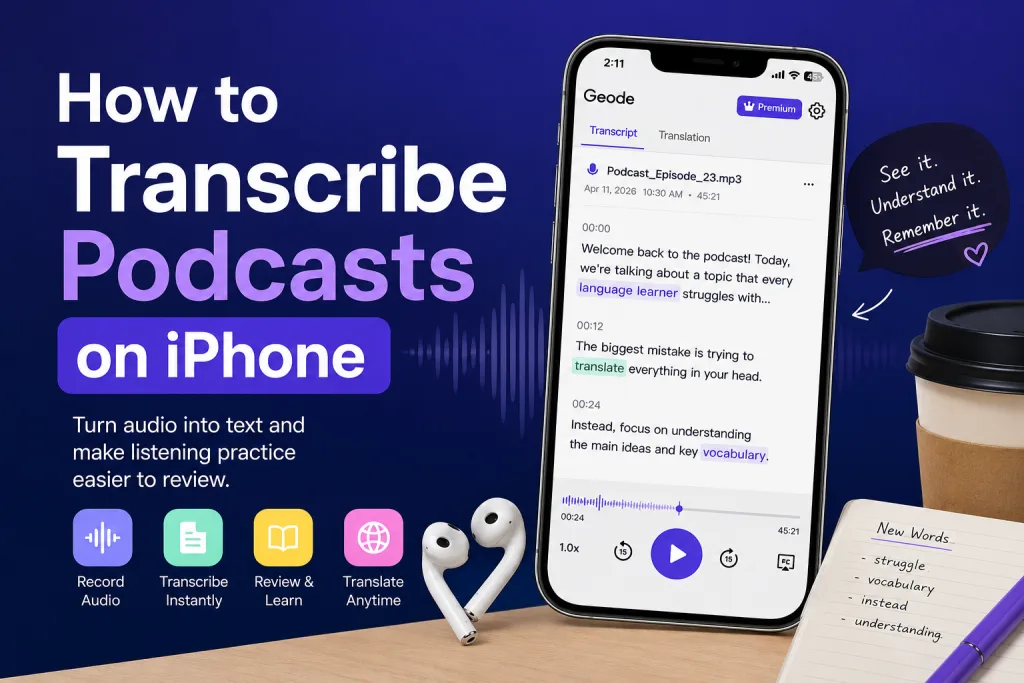
Podcasts are excellent language-learning material because they sound natural, move at real speed, and expose you to everyday expressions. The problem is that audio disappears as soon as it is spoken. If you miss a sentence, you may have to rewind again and again without knowing exactly what was said. A transcript gives you a stable study layer: you can listen first, then read, then replay the exact sentence that caused trouble.
What Does It Mean to Transcribe Podcasts on iPhone?
To transcribe podcasts on iPhone means converting spoken podcast audio into written text so you can search, review, and study it later. For language learners, this is different from simply listening. A transcript turns the podcast into a reusable learning resource.
A strong workflow usually looks like this: listen to the episode, capture the useful section where permitted, generate a transcript, and review the lines you did not fully understand. If you want a broader setup for lessons and videos, connect this article with your guide on how to transcribe audio on iPhone.
Why Podcasts Without Transcripts Slow Down Learning
Podcasts without transcripts are difficult because learners cannot confirm what they heard. Even if you recognize some words, you may miss connected speech, reduced sounds, idioms, names, or grammar patterns. That often leads to guessing instead of understanding.
This is especially common for language learners who are just starting to build a listening routine. They may know vocabulary from apps or flashcards, but real speech feels much faster. Without text, they cannot easily separate words, check spelling, or save useful phrases for review.
A transcript does not replace listening. It supports listening. You still train your ear, but you also give your brain a clear written reference. That makes audio to text language learning useful for podcasts, YouTube lessons, app-based exercises, interviews, and short clips from real conversations.
How to Use Podcast Transcripts for Language Learning
The best way to study with transcripts is to avoid reading too early. First, listen once without text. Try to understand the topic, tone, and main idea. Then read the transcript and mark the phrases you missed. Finally, replay the audio while following the text line by line.
Listen first: Play a short section without looking at text. This helps you train real listening instead of depending on reading.
Read the transcript: Check the words you missed, especially contractions, informal phrases, and pronunciation changes.
Replay difficult lines: Repeat the same sentence until the sound and the written form connect in your memory.
Save useful phrases: Turn natural expressions into review notes instead of memorizing isolated vocabulary.
This simple listen-read-replay loop can make podcast transcripts for language learning much more effective than passive listening. For more review workflows, link to your article on audio to text language learning.
Best Method: Capture Audio, Transcribe, and Review
When a podcast or lesson does not include a transcript, the most practical method is to use an iPhone transcription app that can turn supported audio into text. The goal is not just to create text. The goal is to make the audio searchable, replayable, and easier to study.
Geode is designed for this type of workflow. It helps learners capture supported audio from their iPhone workflow, generate readable transcripts, translate when needed, and review the content later. For D1 language learners, this is useful because it changes a podcast from something you only hear into something you can actively study.
A helpful use case is a learner listening to a Spanish podcast and missing one key phrase. Instead of replaying blindly, they can use a transcript to see the sentence, check the meaning, and replay the exact moment until the rhythm becomes familiar.
If privacy is important, you can also connect this article to a product or blog page about a private transcription app and another page about transcribe app audio so users can move from learning use cases to product education.
What to Look For in an iPhone Transcription App
Not every transcription tool is equally useful for language learning. If your goal is to transcribe podcasts on iPhone, look for features that support study instead of one-time conversion.
Accurate transcripts: Clear text helps you identify unfamiliar words, sentence structure, and natural phrasing.
Replay support: A transcript is much more useful when you can return to the exact audio section.
Translation support: Side-by-side meaning can help when the original language is still above your level.
Search and export: Searchable transcripts and export options make it easier to build study notes.
Privacy controls: Local or user-controlled processing is important for sensitive lessons, interviews, or personal recordings.
A Practical Study Workflow for Podcasts Without Transcripts
Here is a simple workflow you can use when you find podcasts without transcripts:
- Choose a short section, ideally 30 seconds to 2 minutes.
- Listen once without text and write down what you think you heard.
- Generate a transcript from the supported audio source.
- Compare the transcript with your first understanding.
- Translate only the lines that block comprehension.
- Replay the hardest sentences until they sound natural.
- Save the best phrases into your notes for later review.
This approach keeps listening at the center while using transcripts as a learning accelerator. It also prevents the common mistake of reading everything first and turning listening practice into silent reading.
Important Limits and Permissions
Before you transcribe any podcast or app audio, make sure you have permission to use the content in that way. Transcription accuracy can vary depending on audio quality, background noise, speaker accent, and source restrictions. Some apps or platforms may not allow audio capture, and local recording laws may apply.
For language learning, the safest approach is to use transcripts for personal study, respect platform rules, and avoid redistributing copyrighted content. Transcripts are best treated as private learning notes unless you have explicit permission to share them.
Conclusion: Make Real Audio Easier to Study
If you want to improve listening, real audio is one of the best resources available. But podcasts without transcripts can make practice frustrating because you cannot easily confirm what you heard.
Learning how to transcribe podcasts on iPhone gives you a better workflow: listen first, read the transcript, replay difficult lines, translate when needed, and save phrases for review. With tools like Geode, language learners can turn podcasts, lessons, and app audio into study material that is easier to understand and easier to revisit.
Last reviewed: August 2026
How can I transcribe podcasts on iPhone?
You can transcribe podcasts on iPhone by using a transcription tool that converts supported audio into text. For language learning, the best workflow is to listen first, then review the transcript and replay difficult lines.
What should I do with podcasts without transcripts?
For podcasts without transcripts, create a transcript from supported audio and use it as a study guide. This helps you confirm vocabulary, sentence meaning, and pronunciation patterns.
Is audio to text language learning useful for beginners?
Yes. Audio to text language learning is useful for beginners because it connects spoken language with written text. It makes fast speech easier to review without replacing listening practice.
Which iPhone transcription app is best for language learning?
The best iPhone transcription app for language learning should support accurate transcripts, replay, translation, export, and privacy controls. Geode is built around this type of review-friendly workflow.