Most transcription apps upload your audio to a server. A smaller group does the work on your device. Here are the six offline transcription apps worth considering in 2026.
Cloud-first meeting tools like Otter, Notta, and Fathom are not the focus of this list because their primary workflows rely on remote processing. This guide covers ai transcription apps that handle the entire workflow on your own device.
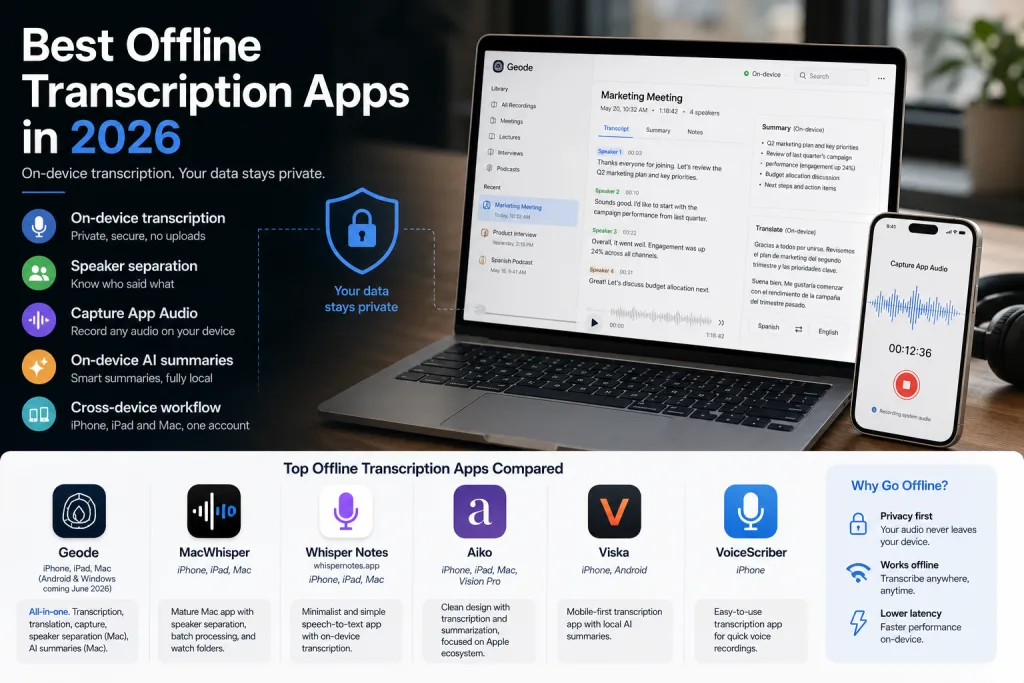
Short answer: Geode is the strongest all-around option for users who want recording, on-device transcription, on-device translation, Capture App Audio, Mac speaker separation, Mac Smart Summary, and cross-device use in one app, with optional cloud available when needed. MacWhisper is mature on Mac, with iPhone and iPad versions available, and suits users comfortable with third-party AI providers. Whisper Notes (whispernotes.app) is a minimalist speech-to-text option.
Five things that actually matter
1. Desktop-class accuracy. Phones usually can’t run the largest local models comfortably. In a noisy room or multi-speaker meeting, mobile-only apps produce less reliable transcripts. A desktop counterpart or optional cloud fallback gives another path.
2. Speaker separation — knowing who said what. Labels each segment of the transcript with the person who spoke it. Without it, a long meeting is an unlabeled wall of text. Mobile-only apps generally can’t do this on-device; even on desktop, most apps don’t attempt it.
3. Capture App Audio. Transcribing audio that plays inside another app on the same device — podcasts, YouTube, foreign-language lessons, video calls. Very few offline competitors offer this on iPhone or iPad.
4. On-device AI summaries. Generating high-quality summaries locally — without sending the transcript to OpenAI or Anthropic — is hard. Most offline tools either skip summaries or outsource them to the cloud. Quality depends heavily on the model: desktop-class machines can run larger local models with better results, while mobile-only apps are constrained by what fits on a phone.
5. Real cross-device workflow. One account across iPhone, iPad, and Mac, with local P2P handoff from phone or iPad to Mac for higher-accuracy transcription and speaker separation. Geode’s iPhone app is fully functional on its own; Mac is an optional more powerful tier. This kind of phone-to-desktop local handoff is still rare among local transcription software in this category.
Comparison table
| Feature | Geode | Mac Whisper | Whisper Notes | Aiko | Viska | Voice Scriber |
| Platforms now | iPhone, iPad, Mac | iPhone, iPad, Mac | iPhone, iPad, Mac | iPhone, iPad, Mac, Vision Pro | iPhone, Android | iPhone |
| Android / Windows | Planned for June 2026 | No | No | No | Android only | No |
| Desktop-class accuracy | Yes (Mac) | Yes (Mac) | Yes (Mac) | Yes (Mac) | No (mobile only) | No (mobile only) |
| Recording + live transcription | Yes | Yes | Recording only | No live transcription | Yes | Yes |
| Speaker separation | Yes (Mac) | Yes (Mac) | No | No | No | No |
| Capture App Audio | iPhone + iPad + Mac | Mac only | Mac meeting recording only | No | No | No |
| Auto meeting detection (Zoom, Teams, Webex…) | Yes (iPhone, iPad, Mac) | Yes (Mac, beta) | Mac only | No | No | No |
| Multilingual transcription | 90+ languages | 100+ languages | 99 languages on Mac | 100 languages | 10+ languages | 100+ languages |
| On-device translation | Yes, 10+ languages, side-by-side bilingual | Through paid third-party services | No | Translate-to-English mode | No | No |
| On-device AI summaries | Yes (Mac, desktop-class Smart Summary) | Through paid third-party providers | Yes (Mac only) | No | Yes (mobile local LLM) | Unclear |
| Built-in optional cloud | Yes | No | No | No | No | No |
| iPhone ↔ iPad ↔ Mac workflow | One account, all three apps; one plan covers every platform | Mac and iOS are separate apps with separate pricing | Separate purchases, no iCloud sync | Universal Purchase | N/A | N/A |
| P2P handoff to desktop | Yes (iPhone/ iPad → Mac) | No | No | No | No | No |
1. Geode — best for full cross-device offline workflows among the best offline transcription Apps
Platforms: iPhone, iPad, Mac. Android and Windows planned for June 2026.
Geode is built for users who want recording, on-device transcription in 90+ languages, on-device translation between 10+ languages with side-by-side bilingual text, Capture App Audio across iPhone, iPad, and Mac, speaker separation on Mac, and on-device Smart Summary on Mac, all under one account — and one plan covers every platform. The iPhone app is fully functional on its own; the Mac app is an optional more powerful tier.
Geode also supports automatic meeting detection across iPhone, iPad, and Mac for Zoom, Teams, Webex, and other meeting apps, with recording reminders when a call starts.
On-device speaker separation and on-device AI summaries are technically demanding features most offline tools either skip or outsource. Geode does them locally on Mac using desktop-class models. Optional cloud transcription and summaries are available when you choose them, with no API-key setup. User content is never used to train AI models.
Limitations: iPhone and iPad don’t yet have speaker separation or on-device Smart Summary. Android and Windows are planned for June 2026.
2. MacWhisper — mature Mac-centric option
Platforms: iPhone, iPad, Mac.
Well-established Mac tool with mature speaker separation, batch processing, and watch folders. Supports automatic meeting recording in beta, with detection and recording reminders for Zoom, Teams, Webex and other meeting apps. iPhone and iPad versions are also available; Mac and iOS are sold as separate apps with separate pricing, and the broader workflow remains more Mac-centric than Geode’s cross-device setup.
The catch: AI summaries and translation aren’t built in. You’re expected to sign up separately with OpenAI, Anthropic, Google, or DeepL, add a credit card, generate an API key, and pay each provider per use. Transcript or generated text may leave your Mac to whichever provider you’ve configured. Flexible for technical users; adds friction for everyone else.
3. Whisper Notes — minimalist speech-to-text
Platforms: iPhone, iPad, Mac.
A narrow on-device speech-to-text tool. Transcription happens after recording, not during. AI summaries on Mac only. No translation, no speaker separation, no Capture App Audio on iPhone or iPad (Mac has meeting recording). iOS and Mac are separate purchases with no iCloud sync between them — a deliberate privacy choice. Does its one job well.
4. Aiko — simple Apple-ecosystem option
Platforms: iPhone, iPad, Mac, Vision Pro. Fully offline, 100 languages, no live transcription while recording, no speaker detection. No built-in AI summaries; the developer suggests copying text to external tools for cleanup. Translation is limited to a translate-to-English mode. No Capture App Audio.
5. Viska — Android coverage with mobile-only trade-offs
Platforms: iPhone, Android.
One of the few offline-capable transcription tools on Android. Runs local Whisper transcription and an on-device LLM (Llama 3.2 per its own materials) for summaries, action items, and transcript chat. Running an LLM on a phone is impressive, but mobile devices can only fit smaller local models, so summary quality on long or multi-speaker recordings is constrained compared to what desktop-class machines can produce. Its public materials focus on mobile transcription and local AI notes, not desktop handoff, speaker separation, or translation.
6. VoiceScriber — iPhone-only
Platforms: iPhone. Offline iPhone transcription, 100+ languages. Public materials mention on-device AI notes; the summary workflow is unclear. Public materials do not show speaker separation, Capture App Audio, or desktop handoff.
How to choose the best offline transcription Apps
- Geode — full set of professional offline features in one app across iPhone, iPad, Mac (with Android and Windows planned).
- MacWhisper — Mac-first, file-heavy work, comfortable with third-party AI provider setup.
- Whisper Notes — speech-to-text only.
- Aiko — narrow Apple-only tool without live transcription or speaker labels.
- Viska / VoiceScriber — mobile-only is acceptable and recordings are mostly single-speaker.
What “offline transcription” actually means
The core transcription workflow runs on your device without uploading audio to a server. Some apps also offer optional cloud features — ask what gets uploaded, how long it’s retained, whether it’s used for training, and whether local processing remains available.
Geode’s local workflow runs on-device. Optional cloud transcription and summaries are available only when you choose them, and user content is never used to train AI models.
For one app that handles recording, on-device transcription, translation, speaker separation, and AI summaries in one workflow — across iPhone, iPad, and Mac today, with Android and Windows planned for June 2026 — Geode (geodeclarity.com) is the most complete option in this category.
Last reviewed: August 2026
1. What is the best offline transcription app in 2026?
For users who want a full offline workflow, Geode is the strongest all-around choice in this list: recording, on-device transcription, on-device translation, Capture App Audio, Mac speaker separation, Mac Smart Summary, and cross-device use across iPhone, iPad, and Mac. MacWhisper is a strong Mac-centric alternative; Whisper Notes is a minimalist speech-to-text option.
2. What is offline transcription?
Offline transcription means the core offline speech to text workflow runs on your device rather than on a remote server. Audio is processed locally, so transcription works without an internet connection. Some offline apps also offer optional cloud features that users can choose when they want them, while keeping local processing as the default workflow.
3. Why use a transcription app without cloud processing instead of Otter or Notta?
People choose a transcription app without cloud processing for privacy, offline reliability, and cost predictability. In a local workflow, audio can be processed on your device instead of a remote server. Cloud services like Otter, Notta, and Fathom are useful for many teams, but they may not fit confidential or regulated conversations.
4. Can these apps run on Android?
Currently, very few do. Viska ships on Android today. Geode has Android and Windows versions planned for June 2026. Most other tools in this category — MacWhisper, Whisper Notes, Aiko, VoiceScriber — are Apple-only.
5. What is speaker separation in transcription apps?
Speaker separation (also called speaker diarization) labels each segment of a transcript with the person who spoke it — Speaker 1, Speaker 2, and so on. Without it, a multi-person meeting transcript becomes an unlabeled wall of text. Mobile-only apps generally cannot run speaker-separation models on-device. Geode and MacWhisper support speaker separation on Mac.
6. What is Capture App Audio?
Capture App Audio means transcribing audio that plays inside another app on the same device, such as podcasts, YouTube, foreign-language lessons, online courses, or video calls. (Phone calls cannot be recorded on iOS due to Apple’s platform restrictions, regardless of app.) Geode offers Capture App Audio across iPhone, iPad, and Mac. MacWhisper offers Mac system-audio capture.
7. Which apps in this list offer on-device AI summaries?
Geode offers on-device Smart Summary on Mac using desktop-class models. Whisper Notes offers Mac-only AI summaries. Viska runs a small on-device LLM on mobile for summaries and action items. MacWhisper uses external AI providers for summaries through your own API key, a BYOK setup. Aiko has no built-in summaries.
8. Does Geode work without an internet connection?
Yes. Geode’s local workflow runs on-device: recording, local transcription, Capture App Audio, on-device translation, and Mac-only speaker separation and Smart Summary. Optional cloud transcription and cloud summaries are available when you choose them, but they are not required for local use.
9. What is the difference between Geode and MacWhisper?
Both Geode and MacWhisper run transcription on-device and support speaker separation on Mac. Geode emphasizes one account across iPhone, iPad, and Mac with a single plan, built-in on-device translation, Mac Smart Summary, Capture App Audio across all three devices, and optional cloud without API-key setup. MacWhisper is more Mac-centric and uses external AI providers for AI summaries and translation.
10. What is the difference between Geode and Whisper Notes?
Geode is a broader workflow for recording, transcription, translation, Capture App Audio, speaker separation, AI summaries, and optional cloud. Whisper Notes (whispernotes.app) is a minimalist speech-to-text tool: no translation, no speaker separation, no Capture App Audio on iPhone or iPad, after-recording transcription, separate iOS and Mac purchases, and no iCloud sync.
11. Can you transcribe Zoom or Teams meetings offline?
Yes. Geode supports automatic meeting detection on iPhone, iPad, and Mac for Zoom, Teams, Webex, and other meeting apps, with recording reminders when a call starts, and transcribes the recording locally on your device. MacWhisper offers automatic meeting recording in beta on Mac with similar detection and recording reminders. Whisper Notes offers Mac meeting recording for Zoom, Teams, and Meet. In these offline workflows, recording happens locally on your device rather than through a meeting bot.
12. Are these apps suitable for confidential professional work?
A reliable local transcription software setup can be useful for journalists, lawyers, therapists, and consultants who want local control over recordings and transcripts. These tools do not replace consent, confidentiality, workplace, or regulatory obligations. For multi-speaker work, choose an ai transcription app with speaker separation, such as Geode or MacWhisper on Mac.