
AI transcript summaries turn a long transcript into a shorter overview of the main topics, decisions, questions, and follow-up points. They are useful when you need to understand the shape of a conversation before reading every line.
The practical rule is simple: use an AI summary to decide where to look, then use the transcript and original audio to verify important wording, attribution, and context. This matters most in interviews, research, client work, and any conversation where a small detail can change the meaning.
What Is an AI Transcript Summary?
An AI transcript summary is a condensed, model-generated explanation of a conversation after it has been transcribed. Instead of presenting every sentence in order, it groups the material into themes or formats it as an overview, meeting notes, key points, or next steps.
It is different from a transcript. A transcript is the detailed text record of what was said. A summary is a shorter interpretation of that record. The two serve different jobs.
| Output | Best for | Do not use it as |
| Transcript | Searching exact terms, reading detail, checking wording | A guaranteed error-free record without review |
| AI summary | Getting oriented, preparing notes, spotting themes | A verified quote or a substitute for source review |
| Original audio | Checking wording, tone, attribution, and context | A convenient first-pass overview |
How AI Transcript Summaries Work
The exact implementation differs by tool, but most AI transcript summaries follow the same sequence.
- Speech is converted into a transcript. The quality of the summary starts with the quality of this text: unclear audio, missing words, or misattributed speakers can affect the output that follows.
- The model looks for patterns in the transcript, such as repeated topics, stated decisions, open questions, names, and changes in the conversation.
- The model produces a shorter structure, often using a chosen format such as an overview, action items, interview themes, or discussion notes.
- A person reviews the summary and returns to the transcript or audio whenever accuracy, attribution, or exact language matters.
| Important boundaryA summary may paraphrase several parts of a conversation into one sentence. It should never be presented as a verbatim statement from a speaker unless the original transcript and audio have been checked. |
Example: From an Interview Summary to the Source
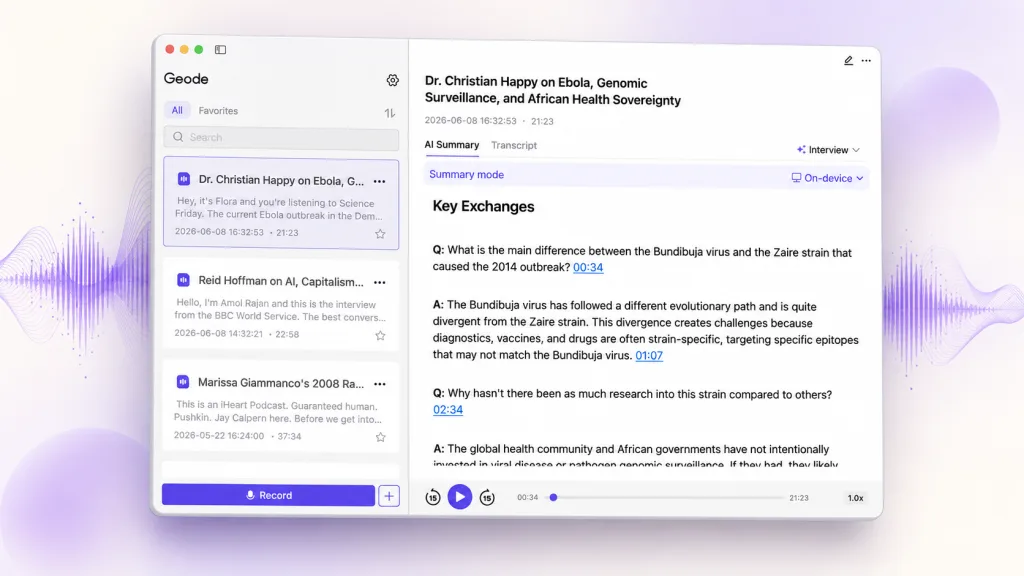
Imagine a 60-minute customer interview. A useful first-pass summary may identify three recurring issues: difficulty getting started, uncertainty about pricing, and a request for a simpler approval flow. That gives the team a review plan without requiring everyone to read the transcript from beginning to end.
Where supported, Geode’s Interview summary template can show timeline references for key summary items. Use a timeline reference to return to the corresponding point in the original audio, then inspect the transcript before treating the point as evidence or sharing it as a quote. A time-linked item speeds up verification; it does not remove the need to check the surrounding context.
AI Transcript Summaries vs. AI Meeting Notes
Both formats condense a conversation, but they answer different questions. Choose the format based on what the reader needs to do next.
| Format | Primary job | Best use |
| Interview summary | Surface themes, perspectives, notable moments, and follow-up questions. | Research, journalism, customer interviews, and qualitative review. |
| Meeting notes | Capture decisions, owners, deadlines, and next steps. | Project meetings, handoffs, and team alignment. |
| Transcript | Preserve detail for search, correction, and verification. | Checking language, attribution, and the full context behind either summary. |
The Pain AI Summaries Actually Solve
The problem is rarely that people cannot generate a transcript. The harder problem is getting useful orientation from 30, 60, or 120 minutes of text without reading it from top to bottom before they know what matters.
| User | Typical pain | Where a summary helps |
| Journalists | A long interview contains several possible story angles, but only a few may matter for the draft. | Create a first-pass map of themes, then verify every publishable quote in the transcript and audio. |
| Researchers | Multiple interviews create pages of similar but scattered material. | Identify recurring themes and prepare a review plan; do not treat the summary as coded evidence. |
| Product and UX teams | Customer calls produce useful observations that are difficult to compare across sessions. | Surface pain points, requests, and patterns before returning to the source material. |
| Managers and project teams | A meeting ends, but decisions and responsibilities are buried in discussion. | Create a concise recap, then confirm owners and commitments with the participants. |
| Students and listeners | Long lectures or podcasts are difficult to revisit efficiently. | Get an outline of the topic, then search the transcript for the section to study. |
When to Use an AI Transcript Summary
AI transcript summaries are most useful when the goal is orientation, organization, or preparation—not when the goal is to establish an exact record.
Good use cases
- Preparing for a second review of a long interview or conversation
- Creating an internal discussion outline from a meeting transcript
- Comparing themes across customer, research, or field interviews
- Turning a lecture, podcast, or recorded briefing into a study outline
- Finding where to begin in a long recording before searching for precise evidence
When not to rely on the summary alone
- Selecting a direct quote for publication
- Confirming a legal, medical, financial, or contractual statement
- Attributing an opinion or commitment to a particular person
- Making a decision where omitted context would materially change the outcome
A Practical Workflow: Summary First, Verification Second
A strong workflow keeps the summary and source material in their proper places.
- Create or import the recording and generate a transcript.
- Use an AI summary to understand the topics, decisions, or possible story angles.
- Make a short list of the names, claims, quotes, and moments that need review.
- Search the transcript for those exact terms, then open the relevant timestamped segment and listen back to the original audio.
- Correct the transcript where needed before exporting notes, using a quote, or sharing conclusions.
This avoids the two common failures: replaying an entire recording just to find one moment, and trusting a concise summary without checking the source.
How Geode Fits This Workflow
Geode is designed to make long recordings easier to review, not to make human review disappear. It helps users create searchable transcripts on supported devices, so they can return to a specific word, phrase, or timestamp instead of replaying an entire recording from the beginning.
On Mac, Geode can generate AI summaries on-device. Cloud summaries are available across platforms when users choose them. Before using any cloud summary option, review what data is sent and choose the workflow that matches the sensitivity of the recording.
In Geode, the transcript and AI summary are separate outputs. Where supported, key items in the Interview summary template can display a timeline reference to help you return to the corresponding audio. This makes it faster to check a key moment. Other summary text should still be treated as an overview: search or browse the transcript and review the relevant timestamped segment before relying on exact wording or attribution.
For multi-person recordings, speaker separation on supported desktop platforms can make the transcript easier to review. It organizes segments by speaker label, but users should still confirm speaker identity and important attribution manually.
| Try it with a real interview Create a searchable transcript, generate an interview summary, and use the transcript and timestamps to replay the moments that matter before you quote, share, or decide. |
How to Get Better AI Transcript Summaries
- Start with the clearest recording available. A summary cannot fully repair a transcript that missed key words or speakers.
- Choose a summary format that matches the job: overview, themes, decisions, open questions, or study notes.
- Use names and domain terms consistently in the transcript before relying on the summary.
- Keep the original recording and transcript available for checking.
- Treat the summary as a navigation layer, not an authoritative source.
Conclusion
AI transcript summaries are most valuable when they save time at the beginning of review. They help people understand what a long conversation contains, choose what to inspect, and organize the next step.
The most reliable workflow keeps the hierarchy clear: summary for orientation, transcript for detail, and audio for verification. That is how you move faster without losing the context that matters.



