
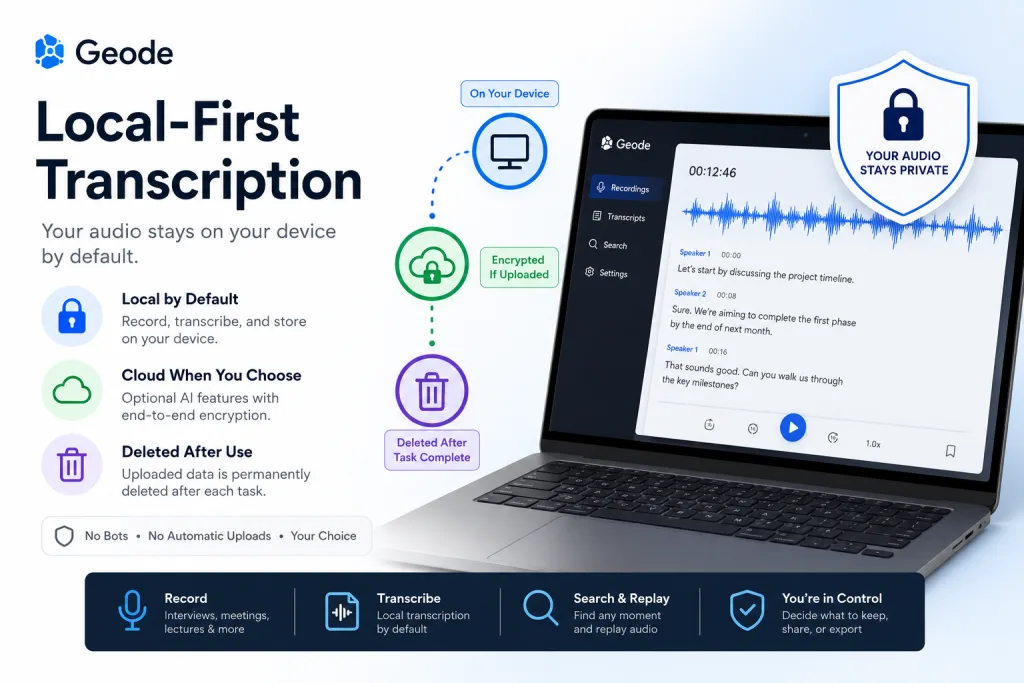
Local-first transcription means your audio is recorded and processed on your device by default, so the basic transcript does not need to be uploaded to a cloud service. This matters because many people ask: is my transcription private, and does transcription upload my audio? Geode answers those questions with a local-by-default model: record and process on device first, then use cloud features only when you choose them.
What Is Local-First Transcription?
This is a product design choice. It means the first path for audio is local: the recording stays on the device, the transcript is created on the device when possible, and the user controls when data should move elsewhere.
This is different from a cloud-only workflow. In a cloud-only workflow, audio often needs to be uploaded before the transcript can be generated. That may be acceptable for some use cases, but it should be a conscious choice rather than a hidden default.
A local-first product should explain the data path in plain language. It should tell users where audio is stored, when it leaves the device, what happens if a cloud feature is selected, and how users can delete files they no longer need.
Does Transcription Upload My Audio?
The honest answer is: it depends on the app and the feature you are using. Some transcription apps upload audio automatically because their speech recognition runs in the cloud. Other apps process audio locally for basic transcription and only upload when the user requests a cloud feature.
This is why the question does transcription upload my audio should appear in every buyer checklist. If a vendor cannot answer clearly, users may not know whether a sensitive interview, client call, lecture, or voice memo is being sent to a remote server.
With Geode, the preferred message is local by default, cloud when you choose. When local processing is used, the audio and transcript do not need to leave the device. If the user actively chooses a cloud capability, the product should make that choice visible and understandable.
What Can Happen in a Cloud-Only Workflow?
Cloud transcription can be useful, but users should understand the possible data flow. A typical cloud-only path may include audio upload, remote processing, temporary or longer storage, subcontracted infrastructure, team sharing settings, and deletion policies.
Some services may also use customer data to improve models, depending on the plan, settings, and policy. Some may retain audio or transcripts for a period of time. Some may change terms after a product update, acquisition, or platform migration. These are not reasons to reject every cloud feature; they are reasons to ask better questions.
The key issue is control. If the user cannot tell when audio leaves the device, who can access it, or how long it is retained, the transcription workflow becomes harder to trust.
Is My Transcription Private? Questions to Ask
Before choosing a transcription tool, ask a few direct questions. Where is my audio processed? Is audio uploaded automatically? Are transcripts stored in the cloud by default? Can I use the app offline? Can I delete recordings and transcripts? Are cloud features optional?
Also ask whether the app uses audio for training or product improvement, and whether that behavior can be disabled. Review the Geode privacy policy and any vendor policy in the same way: look for clear defaults, clear user choices, and clear deletion rules.
For a broader comparison, link readers to a guide on choosing a private transcription app. If they are concerned about network dependency, link them to offline transcription as the next step.
How Geode Uses a Local-by-Default Model
Geode should be described as local by default, not as impossible to leak or universally immune to risk. That distinction matters. When a user records and transcribes locally, data does not need to leave the device for the core workflow. When a user chooses a cloud feature, that should be treated as a separate, intentional action.
This approach supports people who handle interviews, legal discussions, confidential research, internal strategy sessions, medical-adjacent notes, or personal voice memos. It gives them a safer default while preserving flexibility for cases where cloud features are genuinely useful.
The same philosophy also supports bot-free meeting capture. Readers who care about attendee consent and data control should be guided to meeting transcription without bots, because avoiding an automatic bot is another way to reduce unnecessary data movement.
Local Processing vs Cloud-First Transcription
Cloud-first transcription prioritizes remote processing, fast cross-device access, and team collaboration. It can be the right choice for shared workspaces, but it also increases the number of systems involved in the audio path.
Local processing prioritizes user control at the point of capture. It is best when the recording itself is sensitive, when internet access is limited, or when the user wants a transcript before deciding what to share.
The strongest product position is not anti-cloud. It is user choice. Geode can offer local processing as the default and cloud capabilities as optional tools, so users can match the workflow to the sensitivity of the audio.
Conclusion
The moment you hit transcribe, your audio begins a data journey. In some products, that journey starts with an upload. In a local-first model, the journey starts and can remain on your device unless you choose otherwise.
That is the value of Geode’s local-by-default approach. It gives users a clear answer to privacy questions without making absolute promises: your audio and transcript stay on device during local processing, and cloud use is a choice.
For more detail, readers can visit the Geode privacy page and compare the privacy workflow against their own internal data requirements.
Is my transcription private with local-first transcription?
This approach can make your transcription more private because the core workflow processes audio on your device by default. Privacy still depends on your settings, storage, sharing choices, and any cloud features you enable.
Does transcription upload my audio automatically?
Some tools do. Geode’s local transcription does not need to upload your audio by default. If you choose a cloud feature, the required data is uploaded for processing and deleted from Geode’s cloud servers once the task is complete.
Can cloud transcription still be useful?
Yes. Cloud transcription can be useful for collaboration, heavy processing, or optional AI features. The key is that cloud use should be visible, optional, and task-specific.
What should I ask a transcription vendor about audio data?
Ask where audio is processed, whether it is stored, whether it is used for training, how deletion works, and whether local processing is available by default.



