
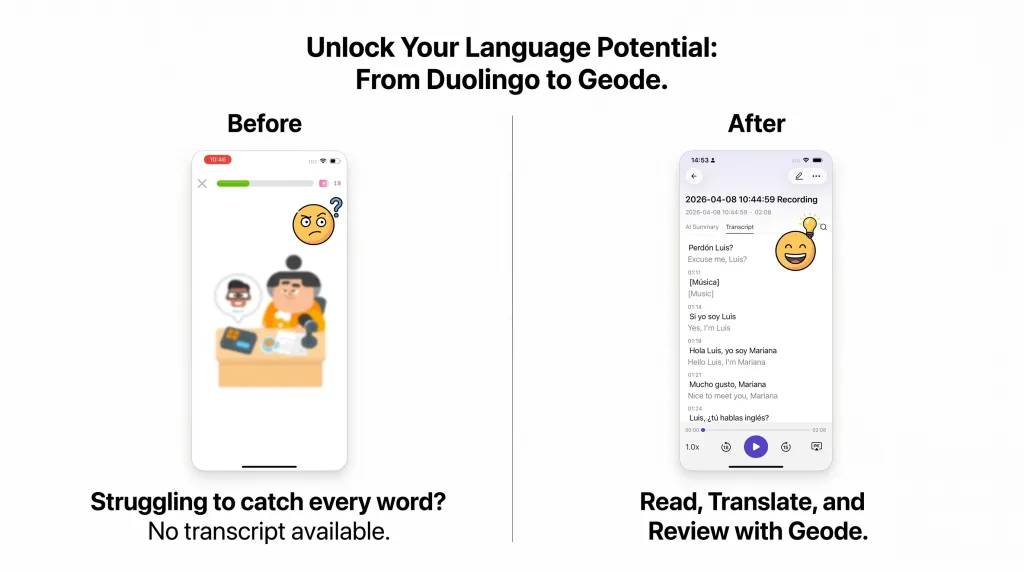
Can’t figure out what a Duolingo listening exercise said, even after replaying it several times? Duolingo listening tests often do not give you a readable text version to check. When one word or phrase is unclear, you can end up guessing at the answer instead of learning from it. What your need is Duolingo audio with transcripts.
A transcript gives you a practical way to see what you missed. With Geode on your phone, you can capture Duolingo audio where permitted, turn it into text, and review the words alongside the recording. Click a transcript segment to jump back to the corresponding point in the captured audio, then listen again with the text in front of you.
| Quick answer Use a transcript after you have tried the exercise normally. It is not a shortcut around listening; it is a way to find the word, sound, or phrase you could not catch and hear it again with context. |
Try It With Your Next Difficult Lesson
Capture supported app audio, read the transcript, and jump back to the part you want to hear again.
7-day trial. No credit card required.
Why Duolingo Audio Can Be Hard to Review
Duolingo audio is designed to test listening, not always to provide a line-by-line study record. That can be useful during the exercise, but it creates a frustrating gap afterward: you may know that you missed something without knowing what the speaker actually said.
- You replay the same duolingo audio several times and still cannot hear one word clearly.
- You cannot confidently check whether the issue was vocabulary, pronunciation, linking, or sentence structure.
- You may get the answer wrong but have no text you can use to learn from the mistake later.
The useful next step is not simply more blind replaying. It is turning the difficult audio into something you can inspect, then returning to the matching sound with a clearer idea of what to listen for.
A 5-Minute Duolingo Audio Review Loop
Use this sequence when a listening exercise will not click. It keeps listening first, then uses text as a targeted review aid.
| Step | What to do |
| 01 | Try the exercise normally. Listen once or twice before looking for text support. |
| 02 | If you still cannot catch the answer, open Geode and use Capture App Audio for supported audio where permitted. |
| 03 | Generate the transcript and read the sentence you missed. Check unfamiliar words, connected speech, and sentence structure. |
| 04 | Click the transcript text to jump back to the corresponding point in the captured audio. Listen again with the words in view. |
| 05 | Keep one useful phrase or sound pattern to review later, then return to the lesson. |
How to Turn Duolingo Audio Into Text on iPhone
Geode provides a capture-to-review workflow for supported audio. Use it for personal study only, where permitted by the relevant platform rules and applicable laws.
| Step | What to do |
| 1 | Open Geode on your iPhone and choose Capture App Audio. |
| 2 | Play the Duolingo listening exercise or other supported learning audio. |
| 3 | Return to Geode and generate the transcript. |
| 4 | Read the transcript to see what the speaker said. |
| 5 | Click the transcript segment to return to the corresponding part of the captured audio and listen again. |
This turns duolingo audio from a one-time test into material you can review: words you can look up, phrases you can revisit, and sounds you can compare against the text.
What to Look For in the Transcript
Do not treat the transcript as an answer key to skim once. Use it to identify why the audio was difficult in the first place.
- A word you did not know.
- A familiar word pronounced differently or spoken quickly.
- Connected words that sounded like one longer sound.
- A short grammar word that changed the meaning of the sentence.
- A phrase you understood only after seeing it written down.
Then click back to that part of the audio and listen again. The goal is to connect the sound to the words, so you are more likely to catch it next time without the transcript.
Beyond Duolingo: Keep Studying From Audio You Actually Use
The same approach can help with supported audio from language-learning apps, podcasts, videos, and online courses. Capture the audio, turn it into text, use translation when helpful, and return to the matching audio when you need another listen.
| For language learners Geode on mobile can capture supported app audio and turn it into transcript text for review, search, translation, and study. Local transcription runs on-device by default; optional cloud features are available when you choose them. |
Important Considerations
- transcription accuracy may vary depending on audio quality
- not all app audio or sources are supported
- transcripts work best as a supplement, not a replacement for listening
- only transcribe content where permitted
- follow platform rules and local recording laws
Turn the Audio You Missed Into Text
Download Geode for your phone and try it with the next listening exercise you cannot work out by ear.
Can I get a transcript for Duolingo listening exercises?
Duolingo listening tests may not provide a readable transcript for every exercise. For supported audio and personal study where permitted, Geode can capture the audio on your phone and generate a transcript you can review.
What is the best way to review Duolingo audio on the phone?
The most effective method is to use a transcription app that captures system audio and produces a readable transcript with translation. This lets you tap any sentence to replay it and read along while listening — something Duolingo’s standard interface does not currently offer.
Is it safe to transcribe Duolingo audio?
If you use an on-device transcription app like Geode, your audio is processed locally and never uploaded to a cloud server. You should still follow Duolingo’s terms of service and only transcribe content for personal study purposes.
Does Geode work with Duolingo on the phone?
Yes. Geode can capture supported system audio from apps running on your phone, including language learning apps. It generates a transcript and translation that you can read and replay sentence by sentence.
Can I transcribe Duolingo audio without internet?
Yes. Geode runs on-device by default, which means you can generate a Duolingo listening transcript without an internet connection. Cloud mode is available if you want higher accuracy.
Can I jump from a transcript back to the audio?
Yes. In Geode, click a transcript segment to jump to the corresponding point in the captured audio. This makes it easier to check a difficult word or phrase by reading it and hearing it again together.
Does this replace listening practice?
No. It works best after you have listened first. The transcript helps you diagnose what you missed, then return to the recording with a more focused ear.



