
Quick answer: Secure legal transcription is a workflow, not a single feature. It combines lawful recording practices, an appropriate processing location, controlled access and storage, careful transcript review, and deliberate sharing. For client, witness, or internal legal interviews, the most useful workflow lets you return from a case-note summary to the relevant audio and verify important wording before you rely on it.
The goal is not to treat an AI transcript or summary as a legal record. The goal is to make the original recording and its written outputs easier to organize, review, and handle responsibly.
This article provides operational information, not legal advice. Recording-consent, confidentiality, professional-responsibility, discovery, and retention requirements vary by jurisdiction, matter, organization, and situation. Follow the rules and policies that apply to your work.
What makes legal transcription “secure”?
A secure legal Local transcription workflow answers five practical questions:
| Workflow question | What to decide |
| Can this conversation be recorded? | Confirm consent, notice, and internal-policy requirements before capture. |
| Where is audio processed? | Choose local or cloud processing deliberately based on the matter and your organization’s approved tools. |
| Who can access the files? | Limit device, folder, workspace, and export access to the people who need it. |
| How is accuracy checked? | Use the recording to verify important names, dates, quotes, figures, and decisions. |
| How are outputs handled? | Define where recordings, transcripts, summaries, and exports are stored, shared, retained, and deleted. |
Encryption may be part of a secure workflow, but it does not answer every question above. The processing location, access paths, retention choices, device security, and review practice all matter.
Why legal interviews need a verification workflow
Legal interviews often contain details that are easy to mishear and expensive to misstate: names, dates, timelines, addresses, quoted language, and the distinction between a witness’s words and an interviewer’s note. AI can accelerate first-pass transcription and organization, but it does not remove the need to verify consequential details against the source audio.
- Use the summary to orient yourself to the interview, not as a substitute for the recording.
- Use the transcript to search for a person, event, date, or phrase.
- Listen again to the relevant passage before relying on a critical detail in a note, filing, or communication.
This review step is particularly valuable after a long client intake, witness interview, or case-strategy discussion, where a written summary may compress nuance or omit the surrounding context.
A practical secure legal transcription workflow
- Confirm the recording boundary. Before recording, determine whether you have the required consent or notice and whether the conversation belongs in an approved workflow.
- Capture with clear ownership. Use an approved device and ensure the recording is stored where the responsible team can manage access and retention.
- Process audio deliberately. Local transcription on supported devices can reduce external data transfer for the transcription step. Cloud processing may be appropriate when it has been approved and the team needs shared access or centralized administration.
- Create a searchable review record. Use the transcript to locate the moments that matter rather than relying on memory or a broad summary alone.
- Verify important passages. Compare key wording with the original audio, especially for quotations, timelines, names, figures, and factual assertions.
- Share and export intentionally. Send only the transcript, excerpt, or notes needed for the next step, and follow your matter’s handling and retention rules.
How the Geode Interview template supports audio verification
Geode’s Interview template is designed for the review stage after an interview is transcribed. It organizes an AI-generated interview summary into key points so you can scan the conversation before going back to the source material.
When a summary point needs checking, click it to jump to the corresponding point in the audio and listen again. This makes it faster to verify the wording and surrounding context behind a key claim, answer, or event without manually searching through a long recording.
This feature supports review; it does not verify facts, establish legal accuracy, or replace professional judgment. For any material detail, listen to the relevant audio and consider the surrounding context before using the information.
Local vs. cloud processing for legal interview transcription
The choice is not automatically local versus cloud. It is which model fits the conversation and your approved workflow.
Local processing
With local processing, audio is transcribed on a supported device. It can be a good fit when the priority is individual capture and review with less routine external transfer. You still need to manage device security, local storage, backups, and exports.
Cloud processing
With cloud processing, audio is sent to provider-managed infrastructure. It can be a good fit when shared access, central administration, and team collaboration are central to the workflow. Evaluate vendor controls, access roles, retention, sharing, and data-processing terms.
No tool choice by itself creates legal compliance or preserves privilege. Use the model that meets your organization’s requirements for the matter and confirm the policies that apply.
How Geode fits a local-first legal review workflow
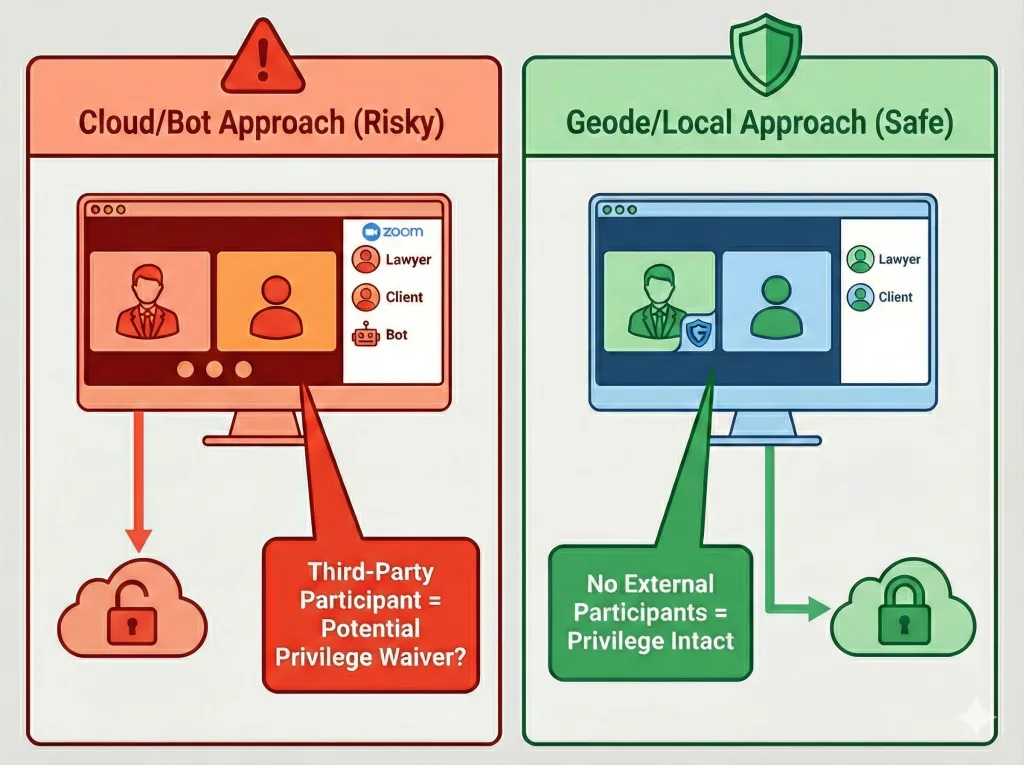
Geode is an AI transcription app for creating a searchable, reviewable record from audio. On supported devices, it offers on-device transcription so users can transcribe locally instead of relying on a cloud-only workflow. Local transcription can run offline after setup on supported devices; internet is still needed for downloads, updates, subscription verification, and optional cloud features.
Geode supports iPhone, iPad, Mac, Android, and Windows. Speaker separation is available on Mac and Windows. The Interview template adds a focused way to move from a summary point back to the corresponding audio for review. Use the recording as the source material and treat the transcript and summary as separate working outputs.
Last reviewed: August 2026
What is secure legal transcription?
Secure legal transcription is the process of turning legal audio into text within a workflow that addresses recording authorization, processing location, access, storage, review, sharing, and retention. It is not a guarantee made by one feature or product label.
Can AI transcription be used for legal interviews?
It can assist with first-pass transcription, search, and organization when the workflow is permitted and appropriately managed. Important wording should be verified against the original recording, and users should follow applicable professional, organizational, and legal requirements.
Why should I verify an interview summary against audio?
A summary condenses a conversation. Returning to the audio helps you confirm wording, attribution, and context before relying on a key point. In Geode’s Interview template, a summary item can be clicked to jump to its corresponding audio point for this review.
Does local transcription make a legal workflow compliant?
No. Local processing can reduce external data transfer during transcription, but compliance also depends on the applicable rules, consent, device security, access, retention, and handling practices.



