MacWhisper for interviews can be a good choice when your workflow starts and ends on a Mac. It is a strong local transcription tool for users who import audio or video files and want a transcript.
But many interview workflows are broader than file-to-text. You may record in the field, move the recording to Mac, search for a quote, replay the original audio, summarize locally, and turn the material into notes or a draft. Geode is built for that broader path across iPhone, iPad, and Mac.
What Is MacWhisper for Interviews Good At?
MacWhisper is useful when a user already has an audio or video file on a Mac and wants local speech-to-text. The official MacWhisper page presents it as a tool for quickly transcribing audio files into text, with Mac-focused features such as file transcription, search, dictation, and meeting recording support.
For solo creators, students, researchers, or Mac power users who work at one desk, this can be a practical setup. Local transcription is valuable because raw interviews can be sensitive, and many users prefer not to upload them by default.
For interview work, MacWhisper can help with the first major step: converting audio into text. It can also support speaker-oriented workflows in compatible setups and can be a strong tool for people who enjoy configuring a Mac-based transcription environment. That is why MacWhisper appears in many interview transcription search journeys.
Where MacWhisper for Interviews Can Add Friction
The challenge is that interviews rarely begin as tidy files on a desktop. An interview workflow may start during a field visit, a documentary research session, a podcast guest recording, or a recorded conversation on the go. The user then needs to move from capture to review, from review to quote verification, and from verification to writing or editing.
MacWhisper is strong for local transcription on Mac. But AI summaries are not built around a simple local summary workflow in the same way. Depending on the version and setup, users may need cloud Assistant features, API keys, or their own local AI configuration. For non-technical interview users, that can add friction.
MacWhisper’s own Assistant support notes explain that AI prompts can use user-provided API keys, and that an optional Assistant subscription can be used for cloud transcription and AI-generated summaries. That can be powerful, but it is not the same as a simple built-in local summary workflow for every interview user.
How Geode Is Different from MacWhisper for Interview Work
Geode is different because it is built around the recording-to-review workflow, not only the file-to-text step. A common workflow is simple: record on iPhone or iPad, send the recording to Mac over local Wi-Fi, then use Mac for high-accuracy local transcription, speaker separation, timestamp replay, local summaries, and editing.
If you already have audio or video files, you can import them directly on Mac. The point is that Geode supports both mobile capture and desktop review without forcing users into separate device licenses.
That is why Geode works well as a MacWhisper alternative for interviews. A field interviewer can record outside the office. A podcast researcher can import a long guest conversation. A documentary researcher can search for a name, event, or quote. A writer can tap a timestamp and replay the exact audio. This makes Geode more useful when the goal is to find and verify moments, not just produce a transcript.
MacWhisper vs Geode for Interview Workflows
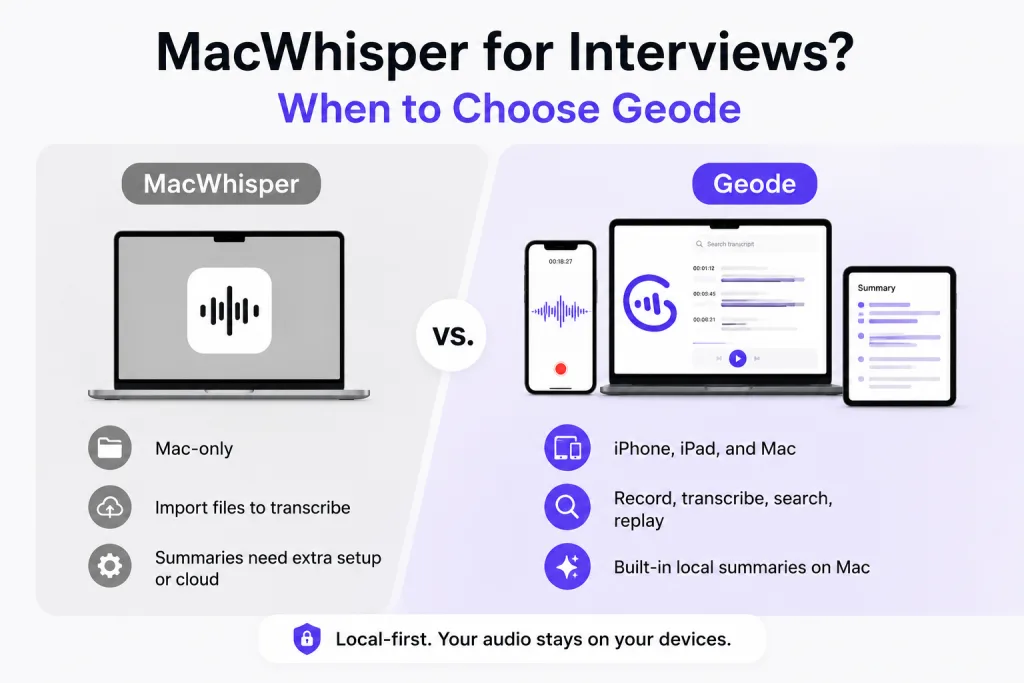
The best tool depends on what the interview workflow actually requires. If the work is mostly file-to-text transcription on a Mac, MacWhisper can be a strong choice. If the work includes field capture, quote verification, local summaries on Mac, and one account across devices, Geode is the better fit.
| Workflow question | MacWhisper | Geode |
| Do I mainly work on one Mac? | Strong fit for local Mac transcription and file-to-text workflows. | Also works on Mac, but designed for cross-device interview workflows. |
| Do I record in the field? | May require a separate capture and transfer workflow. | Record on iPhone or iPad, send to Mac over local Wi-Fi, or import files directly on Mac. |
| Can I search and replay exact moments? | Useful transcript review features may help, depending on workflow. | Search the transcript, tap a timestamp, and replay the exact moment for quote verification. |
| Can I summarize locally? | Unlike Geode’s built-in local Smart Summary on Mac, MacWhisper summary workflows may require cloud Assistant, API keys, or separate setup. | Built-in local Smart Summary on Mac, with templates for turning interviews into usable notes. |
| Do I need one purchase across devices? | Mac and iOS/iPadOS experiences are separate paths, so cross-device users should check current purchase and feature rules. | One Geode account covers iPhone, iPad, and Mac – no separate device licenses for the same workflow. |
| Can free users test advanced quality? | Free tiers and advanced features can vary by platform and setup. | Geode Free includes 5 hours/month of high-accuracy local transcription. On Mac, users can also try speaker separation and local summaries with templates. |
Why Quote Verification Matters More Than Raw Transcription
Interview-heavy users do not simply ask, “Did the app create a transcript?” They ask, “Can I trust this quote? Can I replay the audio? Can I find the line I need on deadline? Can I move this into a draft or edit?” That is where a transcript becomes useful only when it supports verification.
A transcript is a starting point. Quote verification is the work. Geode helps users search for a term, locate the matching transcript line, and replay the audio from the timestamp. This makes it easier to verify context, catch transcription mistakes, and avoid publishing or editing with unchecked text.
Why Local Summaries on Mac Matter for Interviews
Many interview tools stop at audio-to-text. But after transcription, users often need a structured summary, quote list, notes, show notes, or a draft outline. If the audio is sensitive, copying a transcript into a cloud AI chatbot can be a problem.
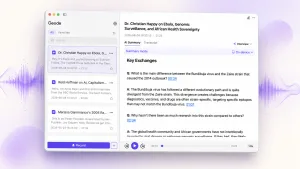
Geode can generate local Smart Summary on Mac, so the user can keep the interview workflow local by default. This is useful for freelance journalists, documentary researchers, podcast producers, interview-based writers, and research teams that need to review and organize material without turning every recording into a cloud task.
When Should You Still Choose MacWhisper?
MacWhisper remains a strong option when you want a Mac-first transcription tool, mainly work with files already on your Mac, enjoy configuring models and providers, and do not need a broader cross-device interview workflow.
Geode fits better when you record away from the desk, work across iPhone, iPad, and Mac, need local summaries on Mac, want timestamp replay for quote verification, and prefer one account for the whole interview workflow.
Pricing and Free Testing for Real Interviews
A good interview tool should be testable with a real recording, not only with a short demo clip. Geode Free gives users 5 hours of local transcription every month with high-accuracy local transcription. On Mac, users can also try speaker separation and local summaries with templates, subject to free plan limits (5 hours/month for local transcription and local summaries).
Paid users get unlimited local transcription and local summaries on Mac, reducing long-recording cost anxiety. For teams or solo creators who use multiple Apple devices, the Lifetime License is also important. One Geode account covers iPhone, iPad, and Mac, so the user does not need to rebuild the same workflow on each device.
For current plan details, see Geode pricing or download Geode to test it with a real interview.
Conclusion: Is MacWhisper for Interviews Enough?
MacWhisper may be enough if the job is mainly local transcription on Mac. It may be exactly right for users who want a focused Mac tool and do not need cross-device capture or a full quote verification workflow.
For users who need cross-device capture, quote verification, and local summaries on Mac, Geode is the better fit. It supports the workflow that happens before and after transcription: recording on iPhone or iPad, sending to Mac over local Wi-Fi, searching transcripts, jumping to the exact audio, verifying quotes, summarizing locally on Mac, and continuing across Apple devices. If your interview work is more than file-to-text conversion, Geode is a strong MacWhisper alternative for interviews.
Last reviewed: August 2026
Is MacWhisper for interviews a good option?
Yes. MacWhisper for interviews can be a good option for users who mainly need local transcription on Mac. It is less ideal when the workflow starts in the field and continues across multiple devices.
What is the best MacWhisper alternative for interviews?
Geode is a strong MacWhisper alternative for interviews if you need recording on iPhone or iPad, review on Mac, timestamp replay, quote verification, and local summaries on Mac.
Can Geode help me find and verify interview quotes?
Yes. Geode lets you search the transcript and replay audio from the exact timestamp. That makes it easier to verify the quote before using it in writing, editing, or research.
Does Geode replace MacWhisper?
Not for every user. MacWhisper is strong for Mac transcription. Geode is a better fit for users who need a full interview workflow across devices, including quote search, timestamp replay, and local Smart Summary on Mac.
Is Geode local-first for sensitive interviews?
Yes. Geode is local-first by default for supported features. Transcription can run on-device, Smart Summary runs locally on Mac, and cloud processing is optional when the user chooses it.