
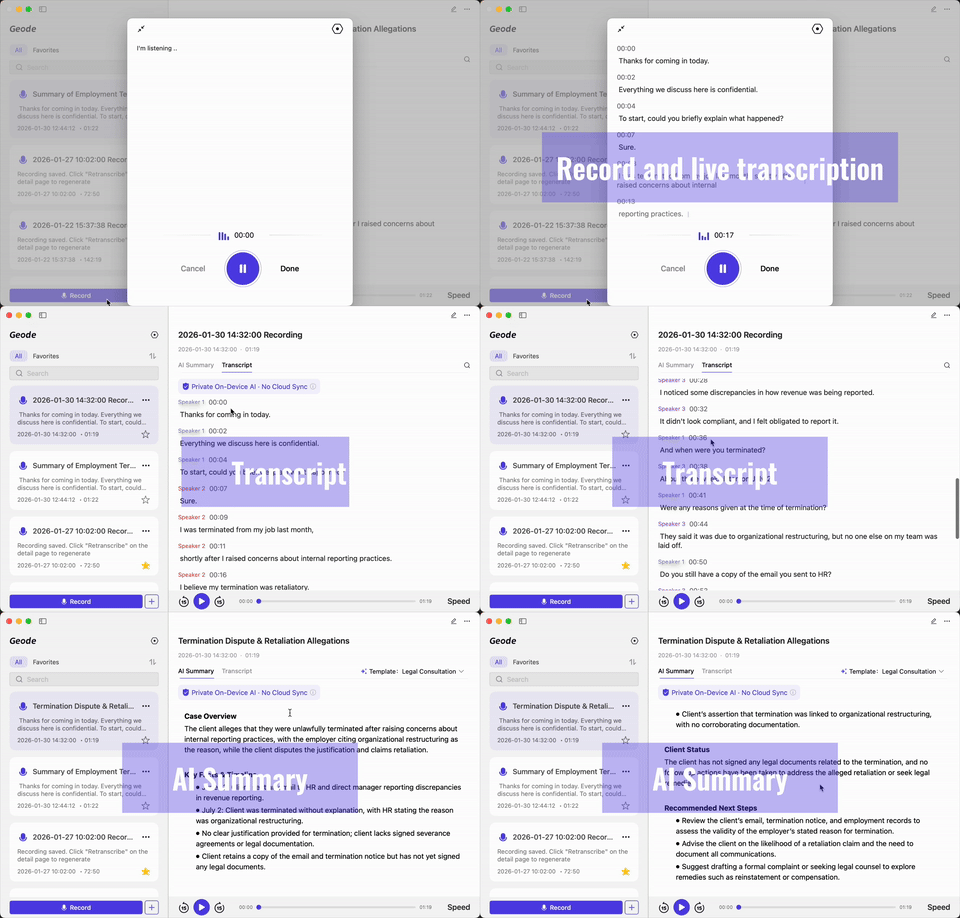
Record wherever the story happens. Turn hours of audio into transcripts you can review and correct, then continue building the story at your desk.Keep sensitive interviews local when it matters. Use optional cloud AI when you decide it is worth it.
 7-day free trial. No credit card required. Then continue on the Free Plan with 5 hours of local transcription every month.
Most transcription tools are designed around scheduled meetings. Journalists work differently.Your reporting may begin in a quiet office, on a crowded street, at a press event, or inside an existing recording. What matters is not an automated meeting recap. It is being able to preserve the interview, review what was said, organize the material, and move useful information into your story.
 Geode is built around that recording-to-review workflow - without requiring a meeting invite or an AI bot in the conversation.
Start on iPhone or Android while the interview is happening. Move the recording over local Wi-Fi to Mac or Windows when you need deeper review, speaker separation, editing, and summaries.
Capture the conversation wherever the story happens.
Move recordings over local Wi-Fi; no cloud upload is required.
Use desktop transcription, speaker separation, and editing.
Review the record, then use a separate summary for orientation.
Capture the conversation wherever the story happens.
Move recordings over local Wi-Fi; no cloud upload is required.
Use desktop transcription, speaker separation, and editing.
Review the record, then use a separate summary for orientation.
One account works across iPhone, iPad, Mac, Android, and Windows — no separate device license required.
Anonymous sources, investigative material, and unpublished reporting should not be forced through a cloud workflow just to become searchable. Keep the work local when that is the right choice; use optional cloud processing only when you decide it is worth it.
Search the transcript for a name, topic, or phrase. Click a matching line to jump to that point in the recording, then replay it before you rely on the wording.
Search the transcript
Find names, topics, and key phrases without replaying the full interview.
Click a transcript line
Jump to the corresponding point in the audio timeline.
Replay to verify
Hear the original wording before using it in your reporting.
Review and edit
Correct names, terminology, and transcription errors in the text record.
Separate and label speakers
Keep multi-person interviews and panels easier to follow.
A two-hour interview should not force you to calculate usage before you can review it. On eligible paid plans, Geode local transcription is unlimited and is not billed by the minute.
Other Tools
You get
Geode
You get
Long-form recording
Work with extended interviews, podcasts, research conversations, and panel discussions.
Predictable local cost
Process paid local transcription without minute caps, overage fees, or per-minute billing.
Structured review
Use speaker separation, editing, and summaries to turn long audio into organized material.
One plan across devices
Use the same eligible plan across supported mobile and desktop platforms.
A two-hour interview should not force you to calculate usage before you can review it. On eligible paid plans, Geode local transcription is unlimited and is not billed by the minute.

Built for the Reporting Work That Happens Between the Interview and the Story.From a noisy field recording to a sensitive source interview, Geode helps you keep the material searchable, reviewable, and under your control.
Weak connectivity and noisy environments can make cloud-dependent workflows impractical.
Replaying a 60- or 90-minute recording just to verify one phrase takes time.
You may not want raw interview material to default to a cloud-based workflow.
Questions, answers, side comments, and panel discussion can become difficult to follow in a raw transcript.
You need to locate material, correct the record, and verify wording without starting from the beginning of the recording.
Make every interview easier to search, replay, verify, and use.
Can't find the answers you're looking for? Click the button below to find the answers you need.
Transcription software for journalists turns recorded interviews, conversations, and field audio into searchable text. Geode also creates a separate AI summary to help users understand and organize a long conversation more efficiently.
Yes. Geode supports local transcription on supported iPhone, iPad, Mac, Android, and Windows devices. Local workflows can run without relying on a cloud transcription service. Optional cloud transcription remains available when you choose it.
Geode can process recordings locally by default on supported devices, which gives journalists greater control over sensitive material. Users should still secure their devices, exports, and backups and follow applicable consent, recording, privacy, and newsroom requirements.
Yes. Speaker separation is available on Mac and Windows. It helps organize interviews, panels, and multi-person conversations so journalists can more easily see who said what.
No. Geode creates a transcript and a separate AI summary. Summary points do not link back to an exact transcript sentence or audio segment, and Geode does not generate verified quotes. Journalists should manually review important wording before publication.
Yes. Geode is designed for long-form audio such as interviews, podcasts, field recordings, and research conversations. On eligible paid plans, local transcription is unlimited and not billed by the minute.
Yes. Geode supports transcription in 90+ languages and offers translation features on supported devices, including live translation on mobile. Feature availability may vary by platform.
Yes. Import existing audio or video from Voice Memos, field recorders, Zoom, Riverside, and other recording tools, then transcribe, search, review, summarize, and export the material in Geode.
Recording and consent requirements vary by location and situation. Journalists should follow applicable laws, professional standards, organizational policies, and informed-consent requirements before recording.
The Discord is the fastest way to get a real answer.
Adding {{itemName}} to cart
Added {{itemName}} to cart