This article is written for operational clarity, not legal advice. If you work with sensitive, regulated, or confidential information, consult your legal or compliance team before making changes to production workflows.
As Zoom expands its AI features across meetings, transcripts, and summaries, many professionals have begun asking a practical question—often framed as a Zoom AI training opt-out:
Can I simply turn Zoom’s AI data usage off—and if I do, is that enough to ensure a defensible decision regarding Zoom AI training opt-out?
The short answer is: you can reduce certain uses. But toggles alone do not change the underlying architecture.
This article explains what Zoom’s AI controls can (and cannot) do, why Zoom AI settings matter for governance, and why teams handling confidential meetings often look beyond cloud-based workflows entirely.
⸻
Part 1: What Zoom’s AI Settings Can (and Cannot) Do
Zoom provides account-level controls related to its AI Companion and data usage. These Zoom AI settings are designed to give administrators more visibility and choice over how AI features operate within their organization.
Zoom describes its approach to data handling, AI usage, and governance in its public trust documentation, including Zoom’s official transparency statements. These materials are useful reference points when evaluating how Zoom positions its AI features and data practices.
Quick Tip:
These controls are typically located in the Zoom web portal under
Account Management → Account Settings → AI Companion.
Since Zoom’s menus and naming conventions change frequently, we recommend checking Zoom’s official support documentation for the most up-to-date navigation steps.
What these settings generally allow you to do:
- Enable or disable specific AI-powered features.
- Control availability at the account, group, or user level.
- Adjust whether certain AI functions are active by default.
What they do not do:
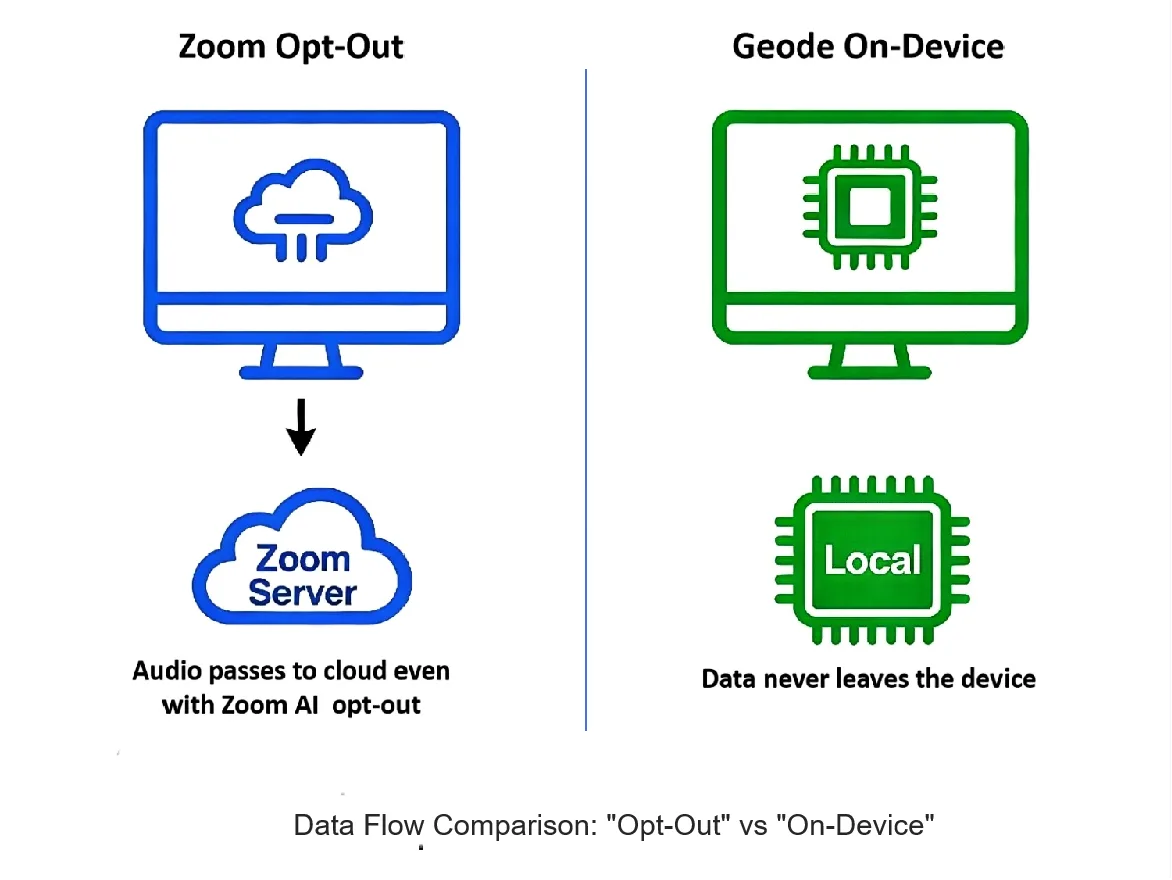
- They do not change where audio is processed.
- They do not convert cloud processing into on-device transcription.
- They do not remove the need to trust Zoom’s backend systems when AI features are used.
These controls are meaningful for governance and transparency. But they operate within Zoom’s cloud architecture, not outside it—an important distinction when evaluating cloud meeting recording risk.
Part 2: Why “Turning It Off” Does Not Change the Architecture
A common misconception behind many Zoom AI training opt-out decisions is that disabling AI features eliminates cloud exposure.
In reality, architecture precedes configuration.
When a meeting is recorded or processed through a cloud service:
- Audio leaves the local device.
- Processing occurs in provider-controlled environments.
- Access is governed through permissions, policies, and contractual obligations.
Disabling AI features may reduce how data is analyzed or reused, but it does not eliminate the existence of an external processing pipeline.
This distinction matters most in confidential contexts—legal strategy, executive discussions, internal investigations—where risk analysis focuses on architecture vs. configuration, not just which features are enabled.
⸻
Part 3: Configuration Controls vs. Structural Constraints
Cloud platforms are built to be configurable:
- Admin consoles
- Permission layers
- Audit logs
- Role-based access controls
These are important safeguards. But they are conditional safeguards. They work as long as:
- Settings remain correct.
- Policies are enforced.
- Systems behave as expected.
Structural constraints operate differently.
If transcription and summaries run entirely on a user’s own device:
- There is no external processing environment.
- There is no shared backend system.
- Access is limited by physical control of the machine itself.
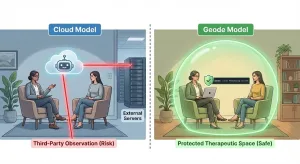
This is why some teams evaluate on-device transcription, kept local for meetings, as a fundamentally different way to constrain risk—especially when reducing long-term cloud meeting recording risk is a priority.
This is not a statement about intent or trustworthiness. It is a statement about how different architectures constrain risk.
For a deeper technical breakdown of how this structural containment works, see our [Architecture Comparison: Cloud vs. On-Device].
⸻
Part 4: When Cloud-Based AI Workflows Make Sense
Cloud AI tools remain a rational choice in many scenarios:
- Large teams that need real-time collaboration.
- Meetings where sharing transcripts broadly is the goal.
- Environments where cloud processing is already accepted and governed.
In these cases, configurability and centralized access can be advantages, even if some degree of cloud meeting recording risk is accepted.
⸻
Part 5: Why Some Teams Choose to Avoid Cloud Processing Entirely
For teams handling privileged or highly sensitive conversations, the question often shifts from:
“How do we configure access?”
to
“Can we eliminate the access surface altogether?”
This is where non-cloud workflows become relevant.
By keeping transcription and summarization on the user’s own hardware, teams can:
- Reduce external exposure by design.
- Avoid usage-based data accumulation.
- Align confidentiality guarantees with physical control, not policy assurances.
⸻
Conclusion: Controls Reduce Use — Architecture Determines Risk
Zoom’s AI settings provide meaningful control. They are worth understanding and configuring correctly, especially when evaluating a Zoom AI training opt-out strategy.
But they do not change the fundamental nature of cloud-based processing.
For confidential meetings, the key decision is architectural:
- Do you rely on configuration and policy?
- Or do you constrain risk by controlling where computation happens?
Understanding that distinction—architecture vs. configuration—helps teams choose workflows they can defend, not just configure.
⸻
A Quiet Next Step
If you’re evaluating how to capture meeting notes without relying on cloud AI processing, you can explore how fully on-device approaches work in practice.
[Download Geode for Mac] to experience on-device transcription, processed local for meetings, without cloud dependency.
Updated: Jan 9, 2026