This article is written for operational clarity, not legal advice. If you work with regulated or confidentiality-sensitive data, validate any workflow decisions with your compliance, security, or legal leadership as appropriate.
Quick answer: Accuracy and privacy are not interchangeable. Accuracy determines whether a transcript is useful; privacy determines how audio is processed, stored, and shared. For sensitive recordings, set your acceptable data-handling boundary first, then choose a transcription workflow and build in review for names, numbers, quotes, and decisions.
A strong transcription workflow does not assume that any transcript is perfect or that one privacy feature solves every risk. It matches the tool’s processing model to the recording, then verifies the parts that matter.
Accuracy vs. privacy: the core difference
| Question | Accuracy | Privacy |
| What does it measure? | How faithfully spoken content becomes usable text. | How the recording is processed, accessed, retained, and shared. |
| Common failure mode | Names, numbers, speaker attribution, or noisy passages are wrong. | Audio moves to systems or people outside the intended workflow. |
| How to improve it | Use clear audio, choose a suitable tool, and verify important passages. | Choose an appropriate processing model and manage device, access, retention, and exports. |
| What to review | The transcript against the original recording for high-consequence details. | The full data path, not only whether encryption is mentioned. |
Step 1: Define what “accurate enough” actually means
Accuracy is not one thing. A tool can be “accurate” in casual meetings and still fail in high-stakes work.
Before you pick a vendor or standardize on transcription tools, clarify what accuracy means for your use case:
- Verbatim fidelity: Do you need word-for-word, or is a clean summary enough?
- Names and numbers: Are you capturing medication dosages, contract terms, financial figures, or client names?
- Speaker attribution: Does it matter who said what?
- Noise tolerance: Will this be in a quiet office, a clinic room, a car, or on a call?
A useful rule:
If errors would be inconvenient, you can prioritize speed and UX.
If errors would be costly, you need a workflow that assumes verification is part of the process.
Step 2: Understand the privacy model behind the feature list
Many transcription tools look similar on the surface—record, transcribe, summarize, share.
But under the hood, they usually fall into one of two models:
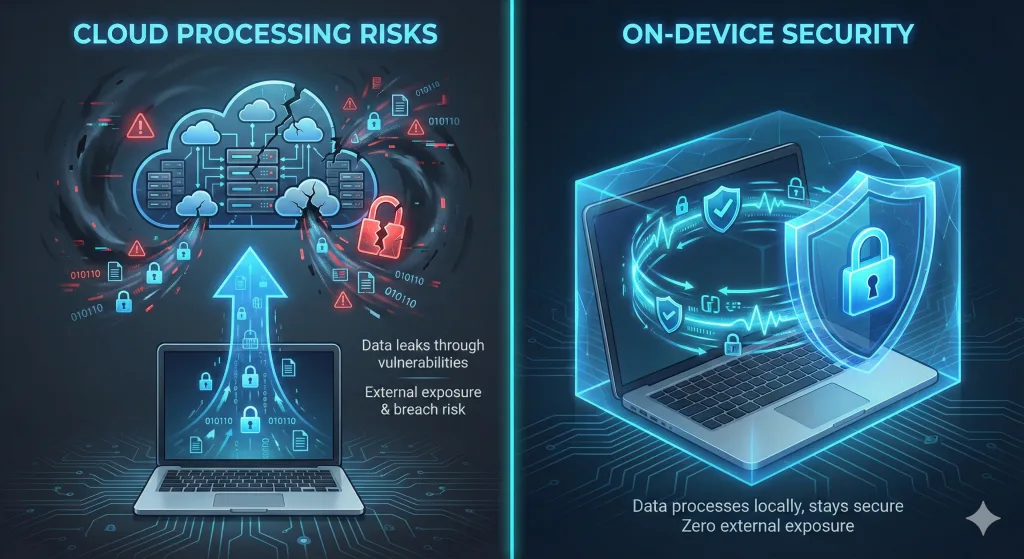
A) Cloud processing
Your audio leaves your device, is processed in provider-controlled infrastructure, and returns as text.
This can offer strong accuracy, fast processing, and easy collaboration. But it also introduces a privacy posture you have to actively manage:
- Data transfer and storage assumptions
- Access surfaces (admin, support, troubleshooting pathways)
- Retention and deletion behavior
- Policy and configuration dependencies
B) On-device processing
Transcription runs locally on your own hardware.
This reduces exposure by design because the workflow can avoid an external processing pipeline. The trade-off is usually compute requirements and, sometimes, slower processing on weaker devices—though recent advances in small-model efficiency mean on-device performance is rapidly closing the gap for many real-world transcription tasks, especially on Apple Silicon-class hardware.
This isn’t about which model is “good” or “bad.”
It’s about what you’re willing to be responsible for—and whether you need secure transcription software that reduces external dependency.
Step 3: Choose the right balance using a simple decision lens
Instead of asking “Which tool is most accurate?”, ask:
1) Is this content confidentiality-sensitive?
Examples: client conversations, patient context, MNPI-adjacent discussions, privileged work, internal strategy.
If yes, you should treat privacy as the primary constraint and build accuracy on top of that—not the other way around.
2) Would you be comfortable if the audio were stored outside your control?
Not as a hypothetical breach scenario—just as an operational reality.
If no, default to a local workflow. For some teams, that means prioritizing offline transcription tools.
3) Do you need collaboration, or do you need control?
Cloud transcription tools are often chosen because sharing is easy. If sharing is not essential, cloud exposure may be an unnecessary trade.
Step 4: Build a “privacy-first” workflow that still hits high accuracy
Here’s the part most teams miss: you don’t need to sacrifice accuracy to improve privacy. You need a workflow that makes accuracy achievable without expanding exposure.
A practical approach looks like this:
- Capture locally whenever possible
- Process locally for sensitive conversations (including on-device transcription where appropriate)
- Verify promptly for critical workflows (ideally by checking uncertain passages against the original audio using synchronized timestamps)
- Deliberately export to your existing system (Notes, Notion, Obsidian, email, Markdown) rather than keeping a long-lived transcript repository in a third-party account
This creates a defensible operating pattern: privacy is constrained by where processing is possible, and accuracy is handled through verification and iteration—aligning better with data security transcription expectations in high-trust environments.
Step 5: Recognize when cloud tools still make sense
There are real scenarios where cloud transcription is appropriate:
- Large distributed teams that rely on shared archives
- Workflows built around cross-device access and centralized management
- Environments with mature governance, enforced configurations, and clear ownership
If your organization already operates with strong controls and actively manages access and retention, cloud can be a rational choice.
The key is intentionality: don’t inherit an architecture by default.
A practical takeaway
The strongest decision-making pattern is:
- Set your privacy boundary first (what must not leave your control?)
- Then choose the most accurate transcription tools that stay inside that boundary
- Finally, operationalize verification for the moments where correctness matters most
Accuracy determines whether a transcript is useful.
Privacy determines whether the workflow is acceptable.
A quiet next step
If you want meeting notes and transcripts without depending on cloud processing, consider offline transcription tools built around an on-device approach—where sensitive audio can stay on your own hardware and exposure is constrained by architecture, not policy.